(GPT IMAGE 2.5)
分享链接 · https://openimages.ajiang.me/p/2102986610908516664/
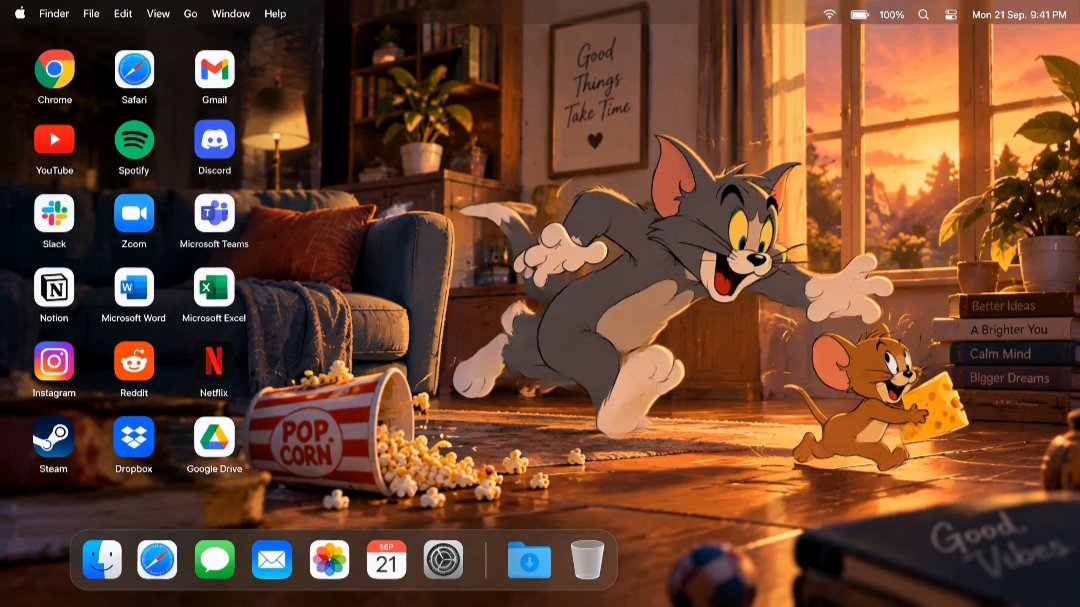
color_palette · warm-tonescomposition · rule-of-thirdscomposition · wide-shotlighting · golden-hourlighting · side-litsubject_type · character
提示词(原文,逐字保留)
(GPT IMAGE 2.5)
"Create a high-end 16:9 desktop screenshot featuring Tom and Jerry as the main characters.
Build an original cinematic cartoon living-room environment at sunset, with warm window light entering from one side, wooden flooring, cozy furniture, soft shadows, scattered playful objects (including a popcorn box and spilled popcorn), and subtle atmospheric depth.
Place Tom and Jerry together on the RIGHT side in an expressive playful moment, preserving their recognizable classic cartoon appearance, proportions, colors, facial expressions, clothing/details, and original 2D animation aesthetic.
Tom should be reacting dramatically while Jerry appears mischievous, creating a natural storytelling moment. Keep both characters fully visible and avoid cropping faces, hands, tails, or important details.
Use warm golden-orange lighting mixed with deep brown, cream, muted red, and soft blue accents. Add subtle cinematic lighting and depth while keeping the artwork clearly cartoon-styled.
Reserve the LEFT side for desktop shortcuts. Add exactly 18 applications in three columns and six rows:
Chrome | Safari | Gmail
YouTube | Spotify | Discord
Slack | Zoom | Microsoft Teams
Notion | Word | Excel
Instagram | Reddit | Netflix
Steam | Dropbox | Google Drive
Use clean recognizable application logos, identical sizing, generous spacing, and crisp white labels.
Add a realistic translucent macOS menu bar across the top:
Apple logo, Finder, File, Edit, View, Go, Window, Help
with Wi-Fi, battery, control icons, and clock on the right.
Add a floating translucent Dock along the bottom, positioned toward the LEFT so Tom and Jerry remain unobstructed.
Dock:
Finder, Safari, Messages, Mail, Photos, Calendar, System Settings, separator, Downloads, Trash.
Final style: premium animated-film artwork combined with a realistic macOS interface, cinematic composition, clean typography, strong character integration, polished lighting, detailed environment, and balanced negative space.
No laptop, monitor, keyboard, mouse, open applications, extra characters, duplicate icons, large titles, advertisements, banners, or watermark.
Output one finished high-resolution 16:9 edge-to-edge desktop image.
中文译文
(GPT IMAGE 2.5)
"以 Tom and Jerry 为主角,创建一个高端 16:9 桌面截图。
构建一个原创的电影级卡通客厅环境,呈现日落氛围,温暖的光线从一侧窗户照入,木地板,舒适的家具,柔和的阴影,散落的俏皮物件(包括一个爆米花盒和洒落的爆米花),以及微妙的大气纵深。
将 Tom 和 Jerry 一起放置在 RIGHT side(右侧),呈现一个富有表现力的嬉戏瞬间,保留他们可辨识的经典卡通外观、比例、色彩、面部表情、服装/细节,以及原始的 2D 动画美学。
Tom 应该做出夸张的戏剧性反应,而 Jerry 看起来调皮捣蛋,营造一个自然的叙事时刻。保持两个角色完全可见,避免裁剪面部、手部、尾巴或重要细节。
使用温暖的金橙色灯光,混合深棕色、奶油色、柔和的红色和柔和的蓝色点缀。在保持画面明显卡通风格的同时,加入微妙的电影级灯光和纵深。
在 LEFT side(左侧)保留桌面快捷方式的空间。添加正好 18 个应用程序,排列为三列六行:
Chrome | Safari | Gmail
YouTube | Spotify | Discord
Slack | Zoom | Microsoft Teams
Notion | Word | Excel
Instagram | Reddit | Netflix
Steam | Dropbox | Google Drive
使用干净、可辨识的应用程序 logo,尺寸一致,间距充足,标签为清晰的白色。
在顶部添加一个逼真的半透明 macOS 菜单栏:
Apple logo、Finder、File、Edit、View、Go、Window、Help
右侧带有 Wi-Fi、电池、控制图标和时钟。
在底部添加一个浮动半透明 Dock,位置偏向 LEFT side(左侧),以确保 Tom 和 Jerry 不被遮挡。
Dock:
Finder, Safari, Messages, Mail, Photos, Calendar, System Settings, separator, Downloads, Trash.
最终风格:高级动画电影艺术作品与逼真的 macOS 界面相结合,电影级构图,清晰的字体排版,强烈的角色融合,精致的灯光,细致的环境,以及平衡的留白。
不包含笔记本电脑、显示器、键盘、鼠标、打开的应用程序、额外的角色、重复的图标、巨大的标题、广告、横幅或水印。
输出一张完成的高分辨率 16:9 边缘到边缘桌面图像。
来源与署名
原文由 @I_Muhammadali44 发布在 X:查看原推文。 本页逐字保留原文并提供机器翻译的中文解读;版权归原作者所有。
同工具的更多提示词
- 直接基于上传的照片,创建一幅精致的 3:4 纵向编辑艺术海报。将构图分为两个等高的水平面板。 上面板:将照片保留为主要视觉内容,保持人物、面部外观、姿势、服装…@weiinberg
- 以上传的照片作为唯一的身份参考,创建一个与本人完全一致的、高端专业的角色参考表(CHARACTER REFERENCE SHEET)。 精确保留该人物可辨识的…@SadiaMalik182
- 创作一幅高级电影感的旅行编辑风格人像,灵感来自复古护照印章、机票和奢华目的地明信片。 以参考图像中的人物作为主角,准确保留其面部身份、面部特征、肤色、发型和自…@Naiknelofar788
- GPT image 2.5 在 AI UGC 方面简直逆天…… JSON 提示词如下: { "prompt": "Ultra-realistic candid…@rohanprsd
- { "prompt_type": "photorealistic_social_media_selfie", "objective": "生成一张真实的高分辨…@roninsignal
- 为每张上传的照片单独创建一张高端海报,绝不将多张图片合并。使用 4:5 垂直格式,分为两个相等的部分:上部 50% 和下部 50%。 上部 —— 原版照片 保…@Goodmanprotocol