-- 定义核心数据结构
分享链接 · https://openimages.ajiang.me/p/2066711359589409013/
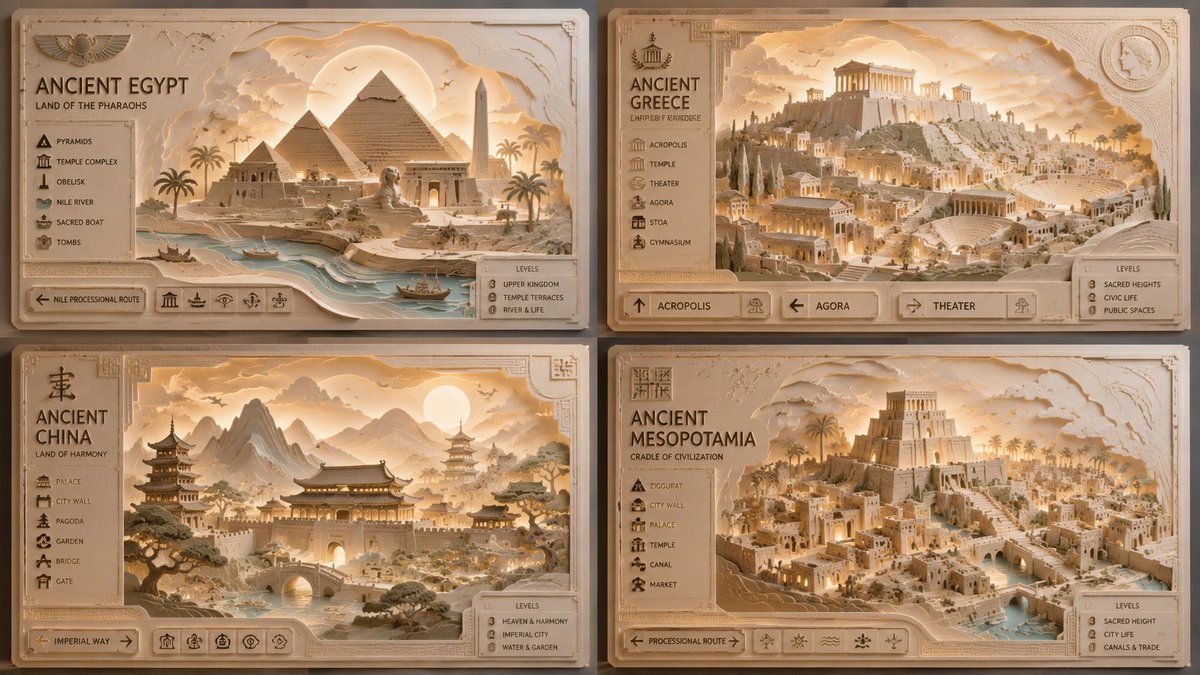
color_palette · warm-tonescomposition · multi-panellighting · golden-hourlighting · high-keyquality_flags · embedded-textscene · historical-setting
提示词(原文,逐字保留)
-- Define the core data structures
type LayerDepth = Float -- 0.0 (back) to 1.0 (front)
type PaperTexture = (Grain, Thickness, Color)
type UI_Element = (Icon, Label, Position)
-- The core generation function
generatePaperDiorama :: CivilizationData -> GridConfig -> RenderSettings -> Image
generatePaperDiorama civ grid settings =
let
-- 1. Extract architectural features from the civilization data
landmarks = extractLandmarks civ
terrain = extractTerrain civ
-- 2. Create the depth map for the paper cut effect
depthMap = createDepthMap [
Layer(0.0, background_sky),
Layer(0.2, distant_mountains),
Layer(0.4, mid_ground_structures),
Layer(0.7, foreground_landmarks),
Layer(0.9, ui_overlay_frame)
]
-- 3. Apply "Paper Cut" rendering pipeline
renderedScene = applyPaperPhysics (
lighting = WarmGoldenHour,
shadowIntensity = HighContrast,
material = TexturedCardstock
) depthMap
-- 4. Compose the UI overlay (dynamic based on civ data)
finalImage = composeUI renderedScene [
Title(civ. name, position=TopLeft),
Legend(civ.landmarks, position=LeftSide),
NavigationArrows(position=Bottom),
LevelIndicator(position=BottomRight)
]
in
finalImage
-- Execute: Generate 2x2 Grid
renderGrid([
generatePaperDiorama(EgyptData, Grid(0,0), Settings),
generatePaperDiorama(GreeceData, Grid(0,1), Settings),
generatePaperDiorama(ChinaData, Grid(1,0), Settings),
generatePaperDiorama(MesopotamiaData, Grid(1,1), Settings)
])
中文译文
-- 定义核心数据结构
type LayerDepth = Float -- 0.0(后方)到 1.0(前方)
type PaperTexture = (Grain, Thickness, Color)
type UI_Element = (Icon, Label, Position)
-- 核心生成函数
generatePaperDiorama :: CivilizationData -> GridConfig -> RenderSettings -> Image
generatePaperDiorama civ grid settings =
let
-- 1. 从文明数据中提取建筑特征
landmarks = extractLandmarks civ
terrain = extractTerrain civ
-- 2. 为纸雕效果创建深度图
depthMap = createDepthMap [
Layer(0.0, background_sky),
Layer(0.2, distant_mountains),
Layer(0.4, mid_ground_structures),
Layer(0.7, foreground_landmarks),
Layer(0.9, ui_overlay_frame)
]
-- 3. 应用 "Paper Cut" 渲染管线
renderedScene = applyPaperPhysics (
lighting = WarmGoldenHour,
shadowIntensity = HighContrast,
material = TexturedCardstock
) depthMap
-- 4. 合成 UI 叠加层(根据文明数据动态生成)
finalImage = composeUI renderedScene [
Title(civ. name, position=TopLeft),
Legend(civ.landmarks, position=LeftSide),
NavigationArrows(position=Bottom),
LevelIndicator(position=BottomRight)
]
in
finalImage
-- 执行:生成 2x2 网格
renderGrid([
generatePaperDiorama(EgyptData, Grid(0,0), Settings),
generatePaperDiorama(GreeceData, Grid(0,1), Settings),
generatePaperDiorama(ChinaData, Grid(1,0), Settings),
generatePaperDiorama(MesopotamiaData, Grid(1,1), Settings)
])
来源与署名
原文由 @Gdgtify 发布在 X:查看原推文。 本页逐字保留原文并提供机器翻译的中文解读;版权归原作者所有。
同工具的更多提示词
- 一位惊艳的年轻女性站在充满活力的花海中,沐浴在明亮的自然日光下,留着长直的深棕色头发,肌肤柔和泛光,面部表情平静,身穿浅色粉蓝色麻花纹针织毛衣和白色迷你裙,背…@sakshi___007
- 一张高品质的韩式商业摄影照片,模仿体育杂志封面的风格。[构图与姿势] 半身肖像(胸部以上),略微倾斜的正面视角,主体微微低头俯视镜头。左手将 FIFA 世界杯…@Naiknelofar788
- https://t.co/Md4l0LLWWg prompt: 为 [MOVIE / SERIES NAME](电影/剧集名称)设计一张令人惊艳的 3D 金属…@iamaiistudio
- 超精细的街头艺术足球海报,主角是一位可爱风格的卡通/动漫女孩,拥有鲜艳的紫色长发并扎成高马尾,自信地双臂交叉站立,一只脚踩在足球上。她身穿阿根廷国家足球队主场…@jzaib4269
- 创建一个超现实的时尚编辑场景,呈现一位英俊的年轻男子,面部特征、面部比例、肤色、发型和整体外观必须与参考照片完全一致。 他站在一座褪色的迈阿密汽车旅馆泳池边…@j_smeaton99
- 模糊、低分辨率、解剖结构错误、面部不对称、多余的手指、多余的四肢、主体重复、手部变形、卡通、动漫、CGI、蜡质皮肤、过度修饰的皮肤、不真实的眼睛、过度锐化、对…@mehvishs25