我现在已经开始直接在AiPPT界面内使用Nano Banana 2生成器,不用在不同标签页之间来回切换了。
分享链接 · https://openimages.ajiang.me/p/2037403971602858413/
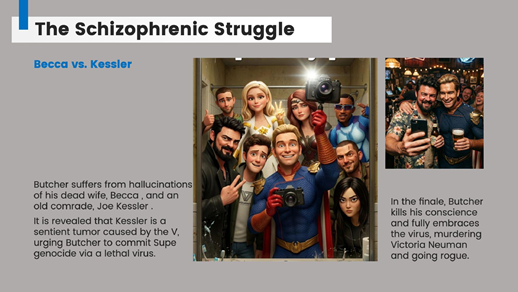
color_palette · warm-tonescomposition · eye-levelcomposition · medium-shotlighting · soft-lightmood · joyfulscene · indoor-home
提示词(原文,逐字保留)
I’ve started using the Nano Banana 2 generator directly inside the AiPPT interface instead of jumping between tabs.
It’s a lot more efficient when I’m iterating on specific visuals, like these "The Boys" character slides. I can tweak the prompt and update the entire color palette without leaving the editor.
For anyone managing a high volume of campaign briefs or tutorials, having everything in one place actually makes a difference in the daily grind.
Prompt👇
High-quality stylized 3D CGI Pixar-style render, vertical 3:4 composition, the most iconic characters from The Boys captured as a chaotic and joyful bathroom mirror selfie; the most recognizable character holds a large vintage camera up toward the mirror, the remaining characters squeezed tightly into the frame around them, each showing their most signature expression or pose; everyone wearing their most iconic costumes and outfits faithful to the source material; all crammed together creating classic crowded selfie energy; facial proportions gently stylized in Disney/Pixar animation style with expressive eyes while faithfully preserving each character's most recognizable traits, hairstyles and costumes from The Boys; the bathroom mirror has realistic toothpaste splatters and subtle smudges; the reflection shows bold black Pixar-style lettering reading "The Boys"; the bathroom background is styled to match the world of The Boys with thematic props and easter eggs relevant to The Boys placed naturally around the scene; lighting combines soft ambient bathroom lighting with a bright camera flash reflecting in the mirror creating gentle specular highlights; warm Pixar-style color grading faithful to the visual tone of The Boys, smooth highlight rolloff, refined Disney/Pixar cinematic character shading, ultra-detailed 4K render, no watermark
中文译文
我现在已经开始直接在AiPPT界面内使用Nano Banana 2生成器,不用在不同标签页之间来回切换了。
当我迭代调整特定视觉内容(比如这些《黑袍纠察队》角色幻灯片)的时候效率高多了。我不用离开编辑器就能调整提示词,更新整个调色板。
对于需要处理大量活动brief或者教程的人来说,把所有内容都放在一个地方真的能给日常工作带来很大变化。
提示词👇
高质量风格化3D CGI皮克斯风格渲染,竖版3:4构图,拍摄《黑袍纠察队》最具标志性角色混乱又开心的浴室镜前自拍;最知名的角色举着一台大复古相机对着镜子,其余角色紧紧挤在镜头里,每个角色都摆出各自最具代表性的表情或姿势;所有人都穿着最符合原作设定的标志性服装;所有人挤在一起,营造经典拥挤自拍的氛围;面部比例按照迪士尼/皮克斯动画风格做轻微风格化处理,眼睛生动传神,同时忠实保留《黑袍纠察队》每个角色最具辨识度的特征、发型和服装;浴室镜子上有逼真的牙膏飞溅痕迹和轻微污渍;镜子反射里有皮克斯风格加粗黑色字体写着"The Boys";浴室背景风格贴合《黑袍纠察队》的世界观,场景中自然摆放着和《黑袍纠察队》相关的主题道具和彩蛋;光线结合柔和的浴室环境光和镜子反射的明亮相机闪光灯,营造出柔和的高光;贴合《黑袍纠察队》视觉调性的暖调皮克斯风格调色,平滑高光过渡,精致迪士尼/皮克斯电影级角色阴影,超精细4K渲染,无水印
来源与署名
原文由 @VermaAakash3 发布在 X:查看原推文。 本页逐字保留原文并提供机器翻译的中文解读;版权归原作者所有。
同工具的更多提示词
- 使用上传的参考照片作为唯一面部身份参考。三张画面中必须出现完全相同的同一张脸。不得改变身份,不得美化,不得风格化,不得重新演绎面部。所有画面中的面部身份必须保…@MrDasOnX
- 提示词分享 🚨 你并非停滞不前。 你只是停留在更早的版本。 提示词 👇(推荐使用:Gemini Nano Banana) 一个电影化的进化序列,展示同一个 3…@edizkan_
- 一张超现实的产品照片,展示一颗健达奇趣蛋放在木桌上。蛋壳包装上有一个[image Uploaded]的Q版/卡通风格插画,背景是涂鸦砖墙。鸡蛋旁边摆放着一个小…@doctorwasif
- { "风格": "照片写实、超细节8K摄影、清晰对焦、鲜艳柔色调色、柔和影棚布光搭配霓虹强调光", "主体": { "人物": "长得像西德尼·斯维尼 (Sy…@l_w_lorenzen
- Gemini Nano Banana Pro 提示词1: 电影感街头摄影作品,一名年轻女子身穿米色风衣站在繁忙的城市街道上,回头张望,神情严肃沉思。柔和自然光…@Sairah_0
- { "image_generation_prompt": { "subject": { "description": "与 Megan Fox 高度相似的女性…@Artist04048661