模型参考提示词
分享链接 · https://openimages.ajiang.me/p/2108536985618952448/
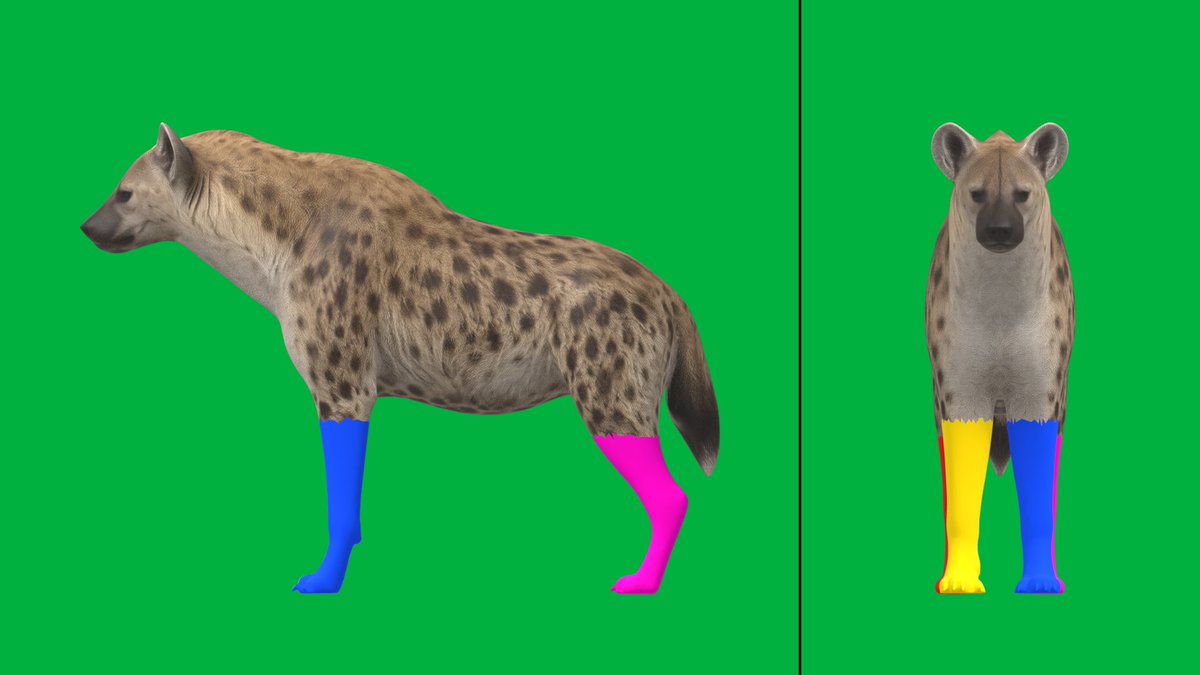
camera_lens · orthographiccolor_palette · high-contrastcolor_palette · neoncomposition · full-bodycomposition · multi-panelsubject_type · animal
提示词(原文,逐字保留)
PROMT for model ref
Character reference sheet of a spotted hyena, two orthographic views on one image:
LEFT: strict side profile (animal facing left, we see its left flank), RIGHT: strict front view.
Same scale in both views, feet on the same ground line.
Realistic spotted hyena anatomy: shoulders clearly higher than hips, sloping back, thick neck, round ears, short bushy tail.
Neutral calm standing pose, all four legs straight and clearly separated, no leg hides another, paws flat on the ground.
Mouth closed, tail hanging down and slightly away from the hind legs.
Flat even lighting, no cast shadows, no perspective, plain light grey background, no text, no props.
PROMT for colored legs in blender
Project root: C:\Users\Max\Documents\3D_Models
=== STRICT FILE RULES (read first, follow always) ===
- Your ONLY writable folder is: C:\Users\Max\Documents\3D_Models\ASTRA MODELS 3d\
Create, copy and save files ONLY inside it.
- EVERYTHING outside that folder is READ-ONLY for you: "WOLF GLB\", CLAUDE.md, AI_ANIMATION_PIPELINE.md,
all .py/.json/.blend/.glb files there. You may open and read them. Never edit, rename, move, delete
or re-save them, and never let a script write output there.
- Never modify the original hyena model:
"ASTRA MODELS 3d\Meshy_AI_Spotted_Hyena_Portrai_1009111429_texture.glb"
- If you think something outside your folder needs changing, STOP and ask me.
=== CONTEXT ===
Read (read-only): CLAUDE.md and AI_ANIMATION_PIPELINE.md (section 3, stage 3 "make_proxy.py").
Blender: "C:\Program Files\Blender Foundation\Blender 5.2\blender.exe", headless ONLY
(--background --python). No GUI, no MCP.
This step was already solved for a wolf. Reuse the existing script. Do NOT rewrite or "improve" its logic.
=== TASK: build the proxy mannequin and the Seedance start frame for the hyena ===
1. Create folder "ASTRA MODELS 3d\hyena_anim".
2. COPY "WOLF GLB\wolf_anim\make_proxy.py" into "ASTRA MODELS 3d\hyena_anim\make_proxy.py".
In the COPY change only the output filename "wolf_proxy.blend" -> "hyena_proxy.blend". Nothing else.
3. Run (from the project root):
"C:\Program Files\Blender Foundation\Blender 5.2\blender.exe" --background --python "ASTRA MODELS 3d\hyena_anim\make_proxy.py" -- "ASTRA MODELS 3d\Meshy_AI_Spotted_Hyena_Portrai_1009111429_texture.glb" "ASTRA MODELS 3d\hyena_anim"
Save the console output to "ASTRA MODELS 3d\hyena_anim\proxy_run.log".
4. What the script should do: find the 4 legs from the rig, paint them by bone weights
(front-left BLUE, back-left MAGENTA, front-right YELLOW, back-right ORANGE), keep the body's own texture.
Two orthographic cameras: side view looks at the animal's LEFT flank, front view looks at the face (mirrored).
Output: seedance_start.png (1920x1080: side 1280 px | black divider | front 640 px, green background),
side.png, front.png, rig_setup.json, hyena_proxy.blend.
=== REPORT (numbers, not "looks fine") ===
- Show me seedance_start.png.
- Bone names assigned to each leg (FL, BL, FR, BR).
- Number of painted polygons per leg.
- Model height (m), meters per pixel, ground line row.
- Confirm each color is on exactly one leg in both panels.
=== HYENA-SPECIFIC CHECK ===
A hyena has longer front legs than hind legs and a sloping back. Check that on ALL four legs the color goes
from the paw up to about the elbow/knee and does NOT spill onto the chest, belly or neck.
If something is wrong: do NOT change the algorithm. Stop and tell me which leg, what height, what is wrong,
and propose a change of ONE parameter (LEG_COLOR_MAX_Z_FRAC or WEIGHT_THRESHOLD) in your copy of the script.
Do not apply it until I confirm.
=== AFTER THIS STEP ===
Never move the cameras. Never overwrite rig_setup.json, hyena_proxy.blend or seedance_start.png.
If a re-run is needed later, write to a new folder (e.g. "hyena_anim_v2").
PROMPT for video (i used omni 1.1)
Use the uploaded image as the EXACT first frame. Do not redesign, recolor, restyle, zoom or reframe anything.
Split-screen technical reference video of the same hyena filmed by two locked-off orthographic cameras at the same time.
Left panel: strict side view. Right panel: strict front view. Both panels show the exact same moment, perfectly synchronized.
MOTION: the hyena WALKS in place, like on a treadmill. Slow calm natural walk, not a trot.
Only ONE leg is in the air at any moment, the other three paws stay on the ground.
Leg order, repeating: MAGENTA PINK, then BLUE, then ORANGE, then YELLOW.
The body stays in the same spot, never moves forward, never turns. Gentle head bob, shoulders and hips sway slightly with each step, tail hangs and sways gently.
LEG COLORS — the most important rule. Each leg has ONE fixed color for the whole video:
front-left = BLUE, back-left = MAGENTA PINK, front-right = YELLOW, back-right = ORANGE.
Every color is on exactly one leg. There are never two blue legs, never two pink legs, never two orange legs, never two yellow legs.
Pink stays pink, it never turns red. Orange stays orange.
LEFT PANEL (side view, hyena faces left): we see the hyena's left side.
Near legs (closer to us): BLUE front leg and MAGENTA PINK back leg.
Far legs (behind them): YELLOW front leg and ORANGE back leg.
When the legs cross, the far legs pass behind the near legs and keep their own colors.
RIGHT PANEL (front view, hyena faces us): on the viewer's right side BLUE front leg with MAGENTA PINK back leg behind it;
on the viewer's left side YELLOW front leg with ORANGE back leg behind it.
CAMERA: never moves. No zoom, no pan, no shake, no cuts. Flat solid green background and the thin black vertical divider line stay unchanged.
Fur texture on body, head and tail stays the same. Same scale, same lighting, same hyena. Mouth closed. No text, no new objects.
中文译文
模型参考提示词
一张斑鬣狗角色参考图,同一画面中包含两个正交视图:
左侧:严格的侧面轮廓(动物朝左,我们看到它的左侧腹),右侧:严格的正面视图。
两个视图比例相同,四足位于同一条地平线上。
写实的斑鬣狗解剖结构:肩部明显高于臀部,背部向下倾斜,脖子粗壮,耳朵圆润,尾巴短而蓬松。
中性平静的站姿,四条腿全部伸直且清晰分开,没有一条腿挡住另一条,爪部平放在地面。
嘴巴闭合,尾巴自然下垂并略微远离后腿。
光线均匀平淡,无投影,无透视,纯浅灰色背景,无文字,无道具。
Blender 中彩色腿部的提示词
项目根目录:C:\Users\Max\Documents\3D_Models
=== 严格的文件规则(先阅读,始终遵守) ===
- 你唯一可写的文件夹是:C:\Users\Max\Documents\3D_Models\ASTRA MODELS 3d\
仅在其中创建、复制和保存文件。
- 该文件夹之外的所有内容对你而言为只读:"WOLF GLB\"、CLAUDE.md、AI_ANIMATION_PIPELINE.md,
以及那里的所有 .py/.json/.blend/.glb 文件。你可以打开和读取它们。绝不要编辑、重命名、移动、删除
或重新保存它们,也绝不允许任何脚本在其中写入输出。
- 不要修改原始的鬣狗模型:
"ASTRA MODELS 3d\Meshy_AI_Spotted_Hyena_Portrai_1009111429_texture.glb"
- 如果你认为你文件夹之外的内容需要更改,请停止并询问我。
=== 上下文 ===
只读读取:CLAUDE.md 和 AI_ANIMATION_PIPELINE.md(第 3 节,阶段 3 "make_proxy.py")。
Blender:"C:\Program Files\Blender Foundation\Blender 5.2\blender.exe",只能无头模式
(--background --python)。无 GUI,无 MCP。
该步骤已为狼模型解决。复用现有脚本。不要重写或"改进"其逻辑。
=== 任务:为鬣狗构建代理人体模型和 Seedance 起始帧 ===
1. 创建文件夹 "ASTRA MODELS 3d\hyena_anim"。
2. 将 "WOLF GLB\wolf_anim\make_proxy.py" 复制到 "ASTRA MODELS 3d\hyena_anim\make_proxy.py"。
在副本中仅更改输出文件名 "wolf_proxy.blend" -> "hyena_proxy.blend"。其他一律不改。
3. 运行(从项目根目录):
"C:\Program Files\Blender Foundation\Blender 5.2\blender.exe" --background --python "ASTRA MODELS 3d\hyena_anim\make_proxy.py" -- "ASTRA MODELS 3d\Meshy_AI_Spotted_Hyena_Portrai_1009111429_texture.glb" "ASTRA MODELS 3d\hyena_anim"
将控制台输出保存到 "ASTRA MODELS 3d\hyena_anim\proxy_run.log"。
4. 脚本应执行的操作:通过骨骼权重从骨骼中找到 4 条腿并上色
(左前腿蓝色,左后腿品红色,右前腿黄色,右后腿橙色),保留身体的原始纹理。
两个正交相机:侧视图朝向动物的左侧腹,正视图朝向脸部(镜像)。
输出:seedance_start.png(1920x1080:侧面 1280 px | 黑色分隔条 | 正面 640 px,绿色背景),
side.png,front.png,rig_setup.json,hyena_proxy.blend。
=== 报告(用数字,不要说"看起来不错") ===
- 给我看 seedance_start.png。
- 分配给每条腿的骨骼名称(FL、BL、FR、BR)。
- 每条腿上色的多边形数量。
- 模型高度(米)、每像素米数、地平线行号。
- 确认在两个面板中每种颜色恰好出现在一条腿上。
=== 鬣狗专项检查 ===
鬣狗的前腿比后腿长,背部向下倾斜。检查四条腿上的颜色是否都从爪子一直延伸到约手肘/膝盖高度,
并且不要溢出到胸部、腹部或颈部。
如果有问题:不要更改算法。停下并告诉我是哪条腿、什么高度、出了什么问题,
并在脚本副本中提出更改一个参数(LEG_COLOR_MAX_Z_FRAC 或 WEIGHT_THRESHOLD)的建议。
在我确认之前不要应用。
=== 完成本步骤之后 ===
绝不要移动相机。绝不要覆盖 rig_setup.json、hyena_proxy.blend 或 seedance_start.png。
如果以后需要重新运行,请输出到一个新文件夹(例如 "hyena_anim_v2")。
视频提示词(我使用的是 omni 1.1)
将上传的图片用作精确的第一帧。不要重新设计、重新上色、改变风格、缩放或重新构图。
同时由两台固定不动的正交相机拍摄同一只鬣狗的分屏技术参考视频。
左面板:严格的侧视图。右面板:严格的正视图。两个面板显示完全相同的瞬间,完美同步。
动作:鬣狗原地行走,像在跑步机上。缓慢、平静、自然的步行,不是小跑。
任何时刻只有一条腿在空中,其他三只爪子保持触地。
腿的顺序循环为:品红色粉色,然后蓝色,然后橙色,然后黄色。
身体保持在同一位置,绝不向前移动,绝不转向。每一步伴随轻微的头部起伏、肩部和臀部轻微摆动,尾巴下垂并轻轻摆动。
腿部颜色 —— 最重要的规则。每条腿在整个视频中只有一种固定颜色:
左前 = 蓝色,左后 = 品红色粉色,右前 = 黄色,右后 = 橙色。
每种颜色恰好出现在一条腿上。绝不会有两条蓝腿、两条粉腿、两条橙腿或两条黄腿。
粉色保持粉,绝不变红。橙色保持橙色。
左面板(侧视图,鬣狗朝左):我们看到鬣狗的左侧。
近腿(更靠近我们):蓝色前腿和品红色粉色后腿。
远腿(在它们后面):黄色前腿和橙色后腿。
当腿交叉时,远腿从近腿后面经过,并保持各自的颜色。
右面板(正视图,鬣狗朝向镜头):在观看者右侧是蓝色前腿,其后是品红色粉色后腿;
在观看者左侧是黄色前腿,其后是橙色后腿。
相机:永不移动。无缩放、无平移、无抖动、无切换。纯绿色背景和细黑色垂直分隔线保持不变。
身体、头部和尾巴的毛发纹理保持不变。同样的比例,同样的光线,同样的鬣狗。嘴巴闭合。无文字,无新物体。
来源与署名
原文由 @maxt3chno 发布在 X:查看原推文。 本页逐字保留原文并提供机器翻译的中文解读;版权归原作者所有。
同工具的更多提示词
- 可爱的拟人化[食物主体]吉祥物,全身像,前四分之三视角,逼真的[食物颜色]表面,带有自然纹理、瑕疵和细致的配料,表情丰富的亮泽眼睛,灿烂的笑容,纤细的同色手臂…@azed_ai
- Primary request: 将输入照片转化为“鎏金古迹纸雕拼贴风”,同时保留照片事实与主体身份。 Input images: 输入照片是唯一内容来源;上…@Hamburgerai
- 一幅令人惊叹的专业地球科学摄影作品,多道闪电同时劈向广袤开阔的草原大地上空那座巨大的超级单体雷暴,云层泛着绿色调并悬挂着雨幕,一棵孤树的剪影作为比例参照,采用…@RockGrokAI
- 试试这条时尚服饰广告活动提示词 提示词 以上传的照片作为面部身份参考。 创建一张超写实、高端的街头服饰时尚摄影拼贴,以四个不同的相机角度展现同一位时髦的年轻黑…@abs_uiux
- 14秒2D动漫动作,16:9。Aoi,一位留着深色马尾辫、身穿藏青色袴的剑士,穿行于雨中的竹林。 https://t.co/33w8JFQFD0@HOSHIKAGEkz
- 摄影与电影摄影 创作一张超现实、高端的夜店时尚摄影照片,画面中是一位二十五六岁的年轻美女,拥有惊艳、女性化且具高级时装模特气质的五官:柔和立体的颧骨、杏仁状棕…@PrometheanAIX