一张照片进 → 六个机位角度出。🎬
分享链接 · https://openimages.ajiang.me/p/2095934699306893404/
camera_lens · 85mm-portraitcamera_lens · shallow-depth-of-fieldcomposition · close-upcomposition · multi-panelcomposition · overhead-flatlayhuman_attributes · short-hair
提示词(原文,逐字保留)
One photo in → six camera angles out. 🎬
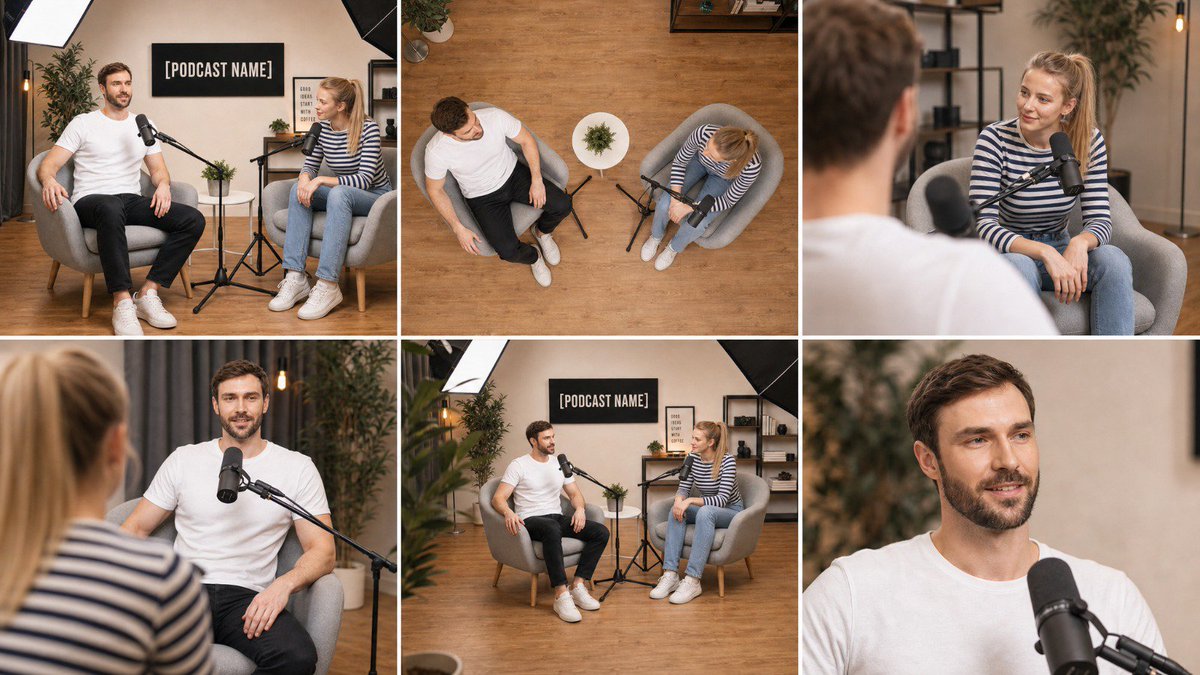
I built a master prompt for GPT Image 2 that takes ANY wide shot and rebuilds the same scene from 6 different camera positions in a clean 3x2 grid.
What you get from a single image:
📷 Wide master shot (same as your original)
🔝 Top-down overhead view from the ceiling
🎙 Over-the-shoulder from the left subject
🎙 Reverse over-the-shoulder from the right subject
📐 Low-angle three-quarter shot from the floor
👤 85mm close-up with shallow depth of field
Same faces, same furniture, same lighting, same wall text — only the camera moves. Works for podcast sets, interiors, product scenes, even single-person shots (it auto-adjusts).
Why this matters: this grid is a ready-made shot list. Drop each panel into Seedance / Veo as a first frame and you have a full multi-cam sequence from one photo.
Tips:
* Set aspect ratio to 16:9 or 3:2 in the UI
* Use a clear, well-lit wide shot as input
* If one panel drifts, fix just that panel in Nano Banana Pro instead of regenerating everything
Prompt is below 👇
Using the attached image as the single source of truth, create ONE image that is a clean 3-column by 2-row grid of six photographs of the EXACT same scene, captured from six different camera positions, as if six cameras were placed around the room at the same instant.
Lock everything from the attached image: the same people with the same faces, hair, skin tone, glasses, clothing and body proportions; the same furniture, props, walls, signage with the same text, lighting setup and color grade; the same time of day. Nothing is added, removed, or rearranged — only the camera position, lens and framing change between panels. Every object stays in the same physical place in the room, so the spatial relationships remain consistent from angle to angle.
Panel 1 (top-left): Wide master shot — the same framing and camera position as the attached image, eye-level, 35mm lens, the full scene visible.
Panel 2 (top-center): High-angle top-down shot — camera mounted directly above the center of the scene looking straight down at the floor, 24mm lens, showing the layout of the furniture, props and people from above, like a ceiling camera.
Panel 3 (top-right): Over-the-shoulder shot from behind the subject on the LEFT of the original image, looking across at the subject on the RIGHT, 50mm lens at f/2.0, the near shoulder soft in the foreground, the far subject sharp.
Panel 4 (bottom-left): Reverse over-the-shoulder shot from behind the subject on the RIGHT of the original image, looking across at the subject on the LEFT, 50mm lens at f/2.0, near shoulder soft, far subject sharp.
Panel 5 (bottom-center): Low-angle three-quarter shot — camera placed low near floor height at the front-left corner of the scene, tilted slightly upward, 28mm lens, showing the scene with depth toward the back wall.
Panel 6 (bottom-right): Tight close-up on the main subject's face and upper body, 85mm lens at f/1.8, eye-level, shallow depth of field, background softly blurred, natural skin texture, catchlights in the eyes.
If the scene contains only one person, apply the over-the-shoulder panels as a three-quarter side angle from the left and from the right of that person instead. If the scene contains no people, treat the main object or furniture group as the subject for panels 3, 4 and 6.
Grid rules: six equal-sized panels, thin clean white gutters between them, no borders, no text labels, no numbers, no captions, no watermarks inside the image. All six panels share identical photographic style: photorealistic, same white balance, same exposure, same color grade, same subtle film grain, consistent lighting direction as in the attached image. Sharp, professional, real-camera look in every panel.
中文译文
一张照片进 → 六个机位角度出。🎬
我为 GPT Image 2 编写了一个主提示词,可以将任意一张广角镜头照片,从 6 个不同的相机机位重新构建成同一个场景,输出为干净的 3×2 网格。
从一张图像中你可以得到:
📷 广角主镜头(与原图一致)
🔝 从天花板俯拍的正俯视视角
🎙 来自左侧人物的过肩镜头
🎙 来自右侧人物的反向过肩镜头
📐 贴近地面的低角度四分之三镜头
👤 85mm 浅景深人像特写
相同的人脸、相同的家具、相同的光线、相同的墙面文字 —— 只有相机在移动。可用于播客布景、室内空间、产品场景,甚至是单人物镜头(会自动适配)。
为什么这很重要:这个网格就是一份现成的镜头清单。把每个面板分别作为首帧送入 Seedance / Veo,就能从一张照片生成完整的多机位序列。
小贴士:
* 在界面中将宽高比设置为 16:9 或 3:2
* 输入一张清晰、光线良好的广角照片
* 如果某一面板有偏差,只需在 Nano Banana Pro 中单独修复该面板,无需重新生成全部内容
提示词如下 👇
以附加图像作为唯一事实来源,创建一张干净的 3 列 × 2 行网格图像,由六张照片组成,呈现完全相同的场景,从六个不同的相机机位拍摄,仿佛在同一瞬间有六台相机分布在房间四周。
锁定附加图像中的所有元素:相同的人物,面部、发型、肤色、眼镜、服装和身体比例完全一致;相同的家具、道具、墙面、含相同文字的标识,以及相同的光照设置和色彩调性;相同的时段。不得新增、删除或重新排列任何内容 —— 只有相机位置、镜头和构图在各面板间发生变化。每个物体在房间中的物理位置保持不变,因此各角度之间的空间关系始终一致。
面板 1(左上):广角主镜头 —— 与附加图像相同的构图和相机位置,平视,35mm 镜头,整个场景完整可见。
面板 2(中上):高角度俯拍镜头 —— 相机直接安装在场景中心正上方,垂直向下俯视地面,24mm 镜头,从上方展示家具、道具和人物的布局,类似天花板摄像头。
面板 3(右上):过肩镜头 —— 从原图左侧人物身后拍摄,越过其肩部看向右侧人物,50mm 镜头光圈 f/2.0,近处肩膀在前景中柔和虚化,远处人物清晰。
面板 4(左下):反向过肩镜头 —— 从原图右侧人物身后拍摄,越过其肩部看向左侧人物,50mm 镜头光圈 f/2.0,近处肩膀柔和,远处人物清晰。
面板 5(中下):低角度四分之三镜头 —— 相机贴近地面放置在场景的左前角,略微向上倾斜,28mm 镜头,向后墙方向展现场景的纵深。
面板 6(右下):主体面部和上半身紧凑特写,85mm 镜头光圈 f/1.8,平视,浅景深,背景柔和虚化,呈现自然肌肤质感,眼睛中有高光点。
如果场景中只有一个人,则将过肩镜头面板改用为该人物左侧和右侧的四分之三侧面角度。如果场景中没有任何人物,则将主体物件或家具组群作为面板 3、4 和 6 的主体。
网格规则:六个尺寸相同的面板,面板之间为细而干净的白色间隔;图像内无边框、无文字标签、无数字、无说明文字、无水印。六个面板共享统一的摄影风格:照片级真实感,相同的白平衡、相同的曝光、相同的色彩调性、相同的细微胶片颗粒,光照方向与附加图像保持一致。每个面板都呈现锐利、专业、真实相机的观感。
来源与署名
原文由 @meAsifAi 发布在 X:查看原推文。 本页逐字保留原文并提供机器翻译的中文解读;版权归原作者所有。
同工具的更多提示词
- 我为 GPT Image 2 写了一个万能主提示词,能把任意两张照片变成专业播客棚拍效果。 上传 2 张照片(男、女皆可),粘贴这个提示词,你就能得到: 🎙…@meAsifAi
- [GPT Image 2 Prompt] | ar 9:16 4K High Created on @TopviewAIhq @topviewaijp #To…@woleswoosh
- "一幅写实风格的桌面静物,颜值超高,魔幻现实主义。一只白色瓷杯装着深色茶水,变成了一片微型海洋:深色的液体翻涌成小小的风暴浪涛,一艘微型的纸帆船带着破烂的白帆…@TraffAlex
- 一张写实风格的食物摄影,无人物,无手部。一个深色现代方形陶瓷盘,放在石质桌面上。盘子中央,一片酥脆的枫叶作为微型画布:在这片叶子上建造一座小镇——有着温暖发光…@TraffAlex
- 超写实微距摄影。一只打开的黄铜怀表放在深色木头上;表盘的位置没有指针,而是一场微缩的活体雷暴——云层、蓝白色闪电、雨水拍打着水晶表镜。表圈周围刻有:"SWIS…@TraffAlex
- 把自己(或你们的整个团队)放进清晨的热气球里。🎈 我为 GPT Image 2 编写了一个 master prompt,可以接收 1 张、2 张或一整组照片…@meAsifAi