7 个导致你的 AI 视频连续性断裂的原因。
分享链接 · https://openimages.ajiang.me/p/2068046234586345488/
color_palette · warm-tonescomposition · multi-panelmood · playfulquality_flags · embedded-textquality_flags · typography-heavysubject_type · diagram-document
提示词(原文,逐字保留)
7 reasons your AI video breaks continuity.
Your character changes face by shot three. Each one has a 30-second fix.
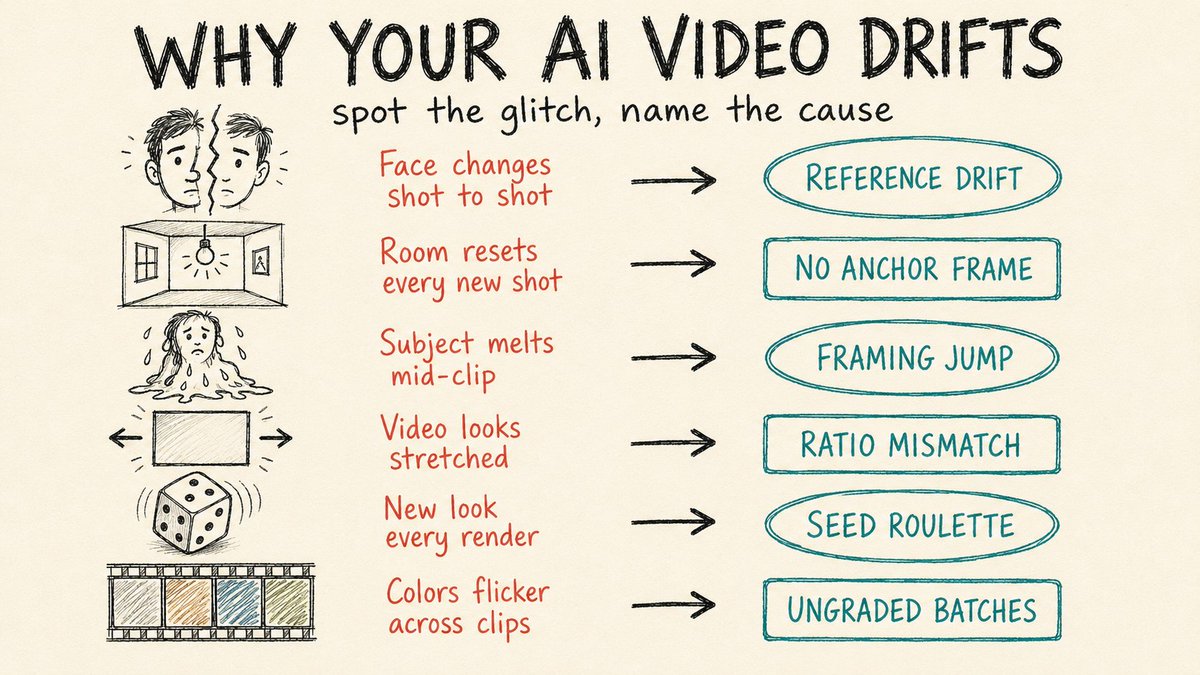
1. Lock one reference image. Pick a single high-quality portrait, crop it tight to 60-80% of the frame, and feed that exact file into every shot. The drift starts the moment you swap references between generations.
2. Use your last frame as the next first frame. Save the final frame of each clip and upload it as the opening frame of the next. Lighting, location, and props carry over instead of resetting to a fresh guess.
3. Keep first and last frames close in framing. Jumping from a wide shot to an extreme close-up forces the model to invent a camera move it can't do, and you get a smeared morph. Move medium to medium-close, or move the subject inside the same frame.
4. Match the frame's aspect ratio to the output. Upload a 16:9 still but render to 9:16, and the model stretches to fill. Set both to the same ratio before you generate.
5. Reuse the seed from your best take. When one generation nails the look, lock its seed and regenerate with small prompt tweaks. Random seeds hand you a different face every run.
6. Grade every clip to one reference. Clips from different batches drift in color temperature and contrast even when the character holds. Pull them all to a single grade in your editor, trim the unstable half-second at each clip's head and tail, and drop short cross-dissolves over the cuts that still jump.
7. Stop stuffing one prompt with five actions. Short clips can't hold a full sequence, so the model rushes and breaks. Use a multi-shot storyboard like Kling 3.0 or Seedance 2.0, or sequence shots with [cut] markers that share the same reference images.
中文译文
7 个导致你的 AI 视频连续性断裂的原因。
到第三个镜头时,你的角色就变了脸。每个问题都有 30 秒的修复方法。
1. 锁定一张参考图。挑一张高质量的肖像照,裁切到画面的 60-80%,然后把同一张文件喂给每一个镜头。一旦你在不同生成之间切换参考图,漂移就开始了。
2. 把上一段的最后一帧当作下一段的第一帧。保存每个片段的最后一帧,把它作为下一段的开场帧上传。这样光线、场景和道具就能延续下来,而不是重新猜测。
3. 让首尾两帧的构图保持接近。从一个全景跳到极近景,会强迫模型去发明一个它做不出的镜头运动,结果就是模糊的变形。改用中景到中近景,或者在同一画面内移动主体。
4. 把帧的宽高比与输出一致。上传 16:9 的静帧却渲染成 9:16,模型就会拉伸去填满。生成之前把两边都设成同样的比例。
5. 复用你最好那条的种子。当某次生成完美呈现了效果,锁定它的种子,然后只做微小的提示词调整再生成。随机种子每次都会给你一张不同的脸。
6. 把所有片段都校色到同一个参考。不同批次生成的片段即使人物保持一致,也会在色温和对比度上漂移。在你的剪辑软件里把它们都拉到统一的色彩,剪掉每条片段头尾不稳定的半秒,并在仍然跳剪的剪辑处加上短促的交叉溶解过渡。
7. 别再往一个提示词里塞五个动作了。短片段撑不住完整序列,模型会匆忙处理然后崩坏。使用像 Kling 3.0 或 Seedance 2.0 这类多镜头分镜工具,或者用共享同一组参考图的 [cut] 标记来串接镜头。
来源与署名
原文由 @free_ai_guides 发布在 X:查看原推文。 本页逐字保留原文并提供机器翻译的中文解读;版权归原作者所有。
同工具的更多提示词
- 超写实方形电影感视频,场景为阳光明媚的高档街边咖啡馆。一位身穿华丽西部风格服装的时尚女性坐在一个圆形黄铜咖啡桌旁,桌后是玻璃店面。玻璃后方,一个白色人形机器人…@ChangningL29508
- 儿童绘本插画 --sref 3904570769 Seedance 2.0 提示词: 15秒电影级动画短片,手工制作的日式水彩动画,精致的铅笔线条艺术,柔和的…@Artedeingenio
- 大多数人都在使用 AI 视频工具。但很少有人知道如何搭建一套完整的 AI 视频制作流水线。 随机剪辑和电影感内容之间的差别,就在于工作流。 这是一份完整的 A…@shushant_l
- 创建一个15秒的电影感多镜头大片级序列,展现一匹飞马在现代摩天大楼峡谷中奋力挣扎飞行。从 image1 开始。保留 image2 中飞马的身份特征。这匹飞马并…@DrSadek_
- 创建一个15秒宽幅电影级风景视频片头,16:9比例,采用Seedance 2.0风格的运动效果。一段无缝一镜到底的数码拼贴动画,灵感源自复古日本插画日历、季节…@ZaraIrahh
- 空中第一人称视角 (FPV) 无人机镜头,采用高速、一镜到底的电影级拍摄手法。 一个面带微笑的小超级英雄以第一人称视角向巨人飞去,沿途撞倒数名兽人,让他们在空…@hedo_ist