获得出色视频转视频效果的秘诀是什么?
分享链接 · https://openimages.ajiang.me/p/2067668872887775741/
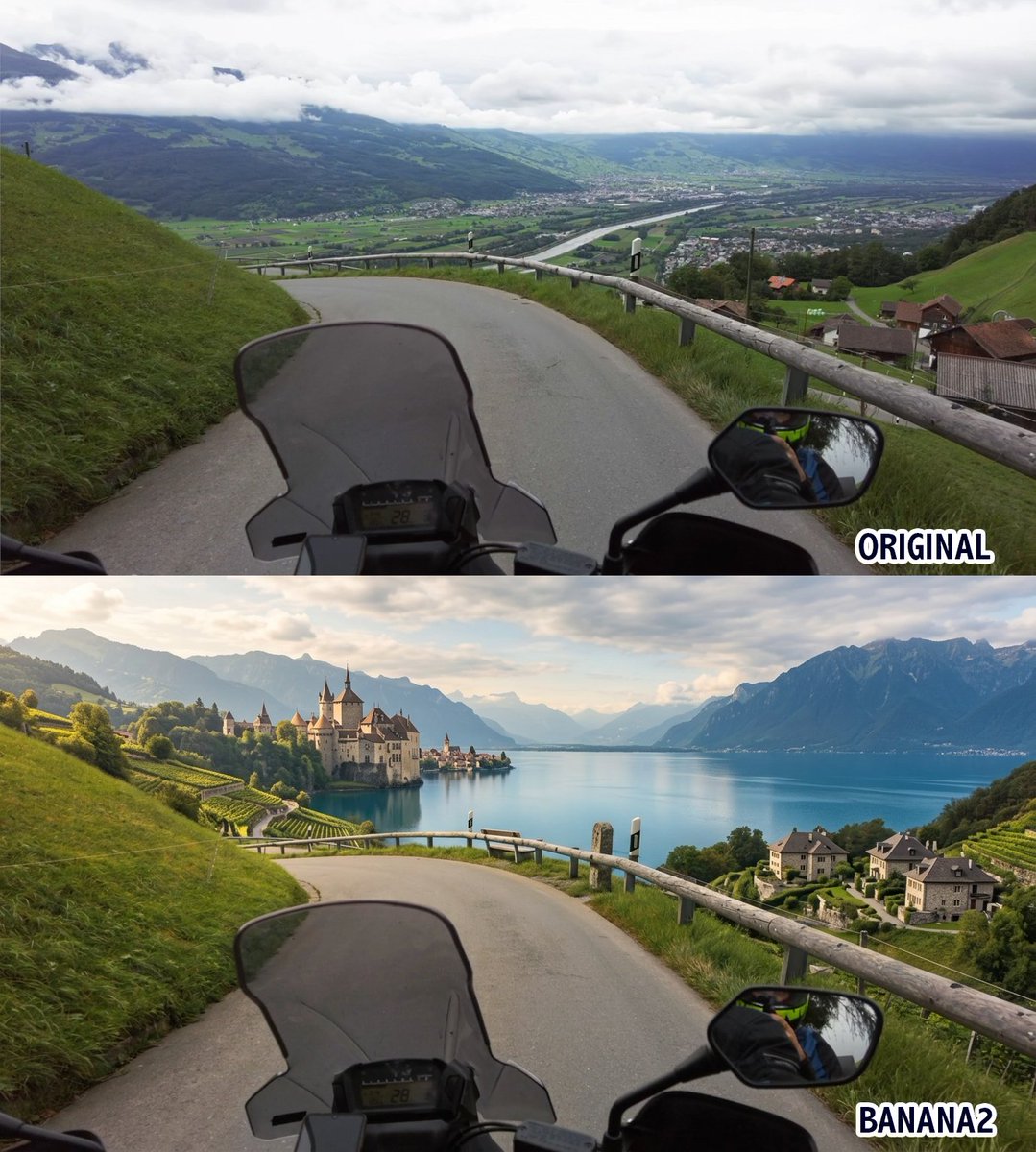
composition · multi-panelcomposition · wide-shotlighting · natural-daylightlighting · soft-lightquality_flags · embedded-textquality_flags · multi-panel-layout
提示词(原文,逐字保留)
The secret to getting great video-to-video results?
Start with the first frame.
Use it as a reference and redesign the entire scene before sending it to Runway Aleph 2.0.
For this step, I used GPT Image 2 inside Firefly Boards.
Prompt 👇
Edit the provided image while preserving the exact same motorcycle first-person perspective, framing, road curve, windshield, handlebar, mirror, and overall composition. Transform the surrounding environment into a breathtaking scenic landscape with a large beautiful lake visible below and a majestic castle in the distance, overlooking the water. Replace the current countryside with a more dramatic and elegant setting featuring green hills, refined natural vegetation, panoramic views, and a romantic castle atmosphere. Keep the road naturally integrated into the terrain, as if riding along a high scenic route above the lake. Use soft natural lighting, atmospheric depth, realistic reflections on the water, and a cinematic fairytale mood. Make the whole scene photorealistic, immersive, and visually stunning.
中文译文
获得出色视频转视频效果的秘诀是什么?
从第一帧开始。
在将画面发送给 Runway Aleph 2.0 之前,先将其作为参考并重新设计整个场景。
在这一步中,我使用了 Firefly Boards 里的 GPT Image 2。
提示词 👇
在保留完全相同的摩托车第一人称视角、构图、道路弯道、挡风玻璃、车把、后视镜及整体画面构成的前提下,编辑所提供的图像。将周围环境改造成令人惊叹的风景景观:下方可见一片广阔而美丽的湖泊,远处矗立着一座俯瞰水面的雄伟城堡。用更具戏剧性和优雅气质的场景替换当前的田园风光,加入青翠的山丘、精致自然的植被、全景视野以及浪漫的城堡氛围。让道路自然地融入地形之中,仿佛骑行在湖上方一条高处的景观公路之上。使用柔和的自然光线、大气透视感、水面上真实的倒影,营造出电影般的童话氛围。使整个场景达到照片级真实、沉浸感强且视觉效果震撼的效果。
来源与署名
原文由 @CharaspowerAI 发布在 X:查看原推文。 本页逐字保留原文并提供机器翻译的中文解读;版权归原作者所有。
同工具的更多提示词
- 创作一张超高细节、手工黏土艺术浮雕海报,竖版 4:5 比例,庆祝 [COUNTRY] 参加 2026 年 FIFA 世界杯。整体构图应呈现高端雕塑黏土与浅浮雕…@Goodmanprotocol
- 使用上传的照片作为面部参考,创建一张充满活力的复古波普艺术拼贴肖像。严格保留人物的面部特征、笑容、眼睛、鼻子、嘴唇、发型和身份。在保持面部逼真且可辨识的前提下…@Fatima_RP120
- https://t.co/SKeFBxX9fB 干净极简的影棚产品照片,背景为温暖的米色墙面,柔和的侧光在表面上投射出长长的阴影。产品以富有趣味的概念性姿态摆…@iamaiistudio
- https://t.co/Bwr1aXcnDx 一幅完整的单一 3D 插画,采用夸张的编辑风格,不是分镜或拼贴布局。 角色是一个卡通化的人物,头部极小,身体圆…@iamaiistudio
- 由 @Flovaai_Japan 创作 #FlovaAI1 1. 角色设定表提示词 (GPT Image 2)📌 创建一张写实风格的 CHARACTER RE…@ivanka_humeniuk
- 瑞士国际主义排版风格,极简平面矢量海报设计,竖版 9:16 格式,大胆对角线分割构图。左上区域:传统中文标题采用经典衬线字体,搭配优雅连体英文手写字体。右下区…@iamaiistudio