大多数人认为 Midjourney 是一个图像生成器。
分享链接 · https://openimages.ajiang.me/p/2064633676231794958/
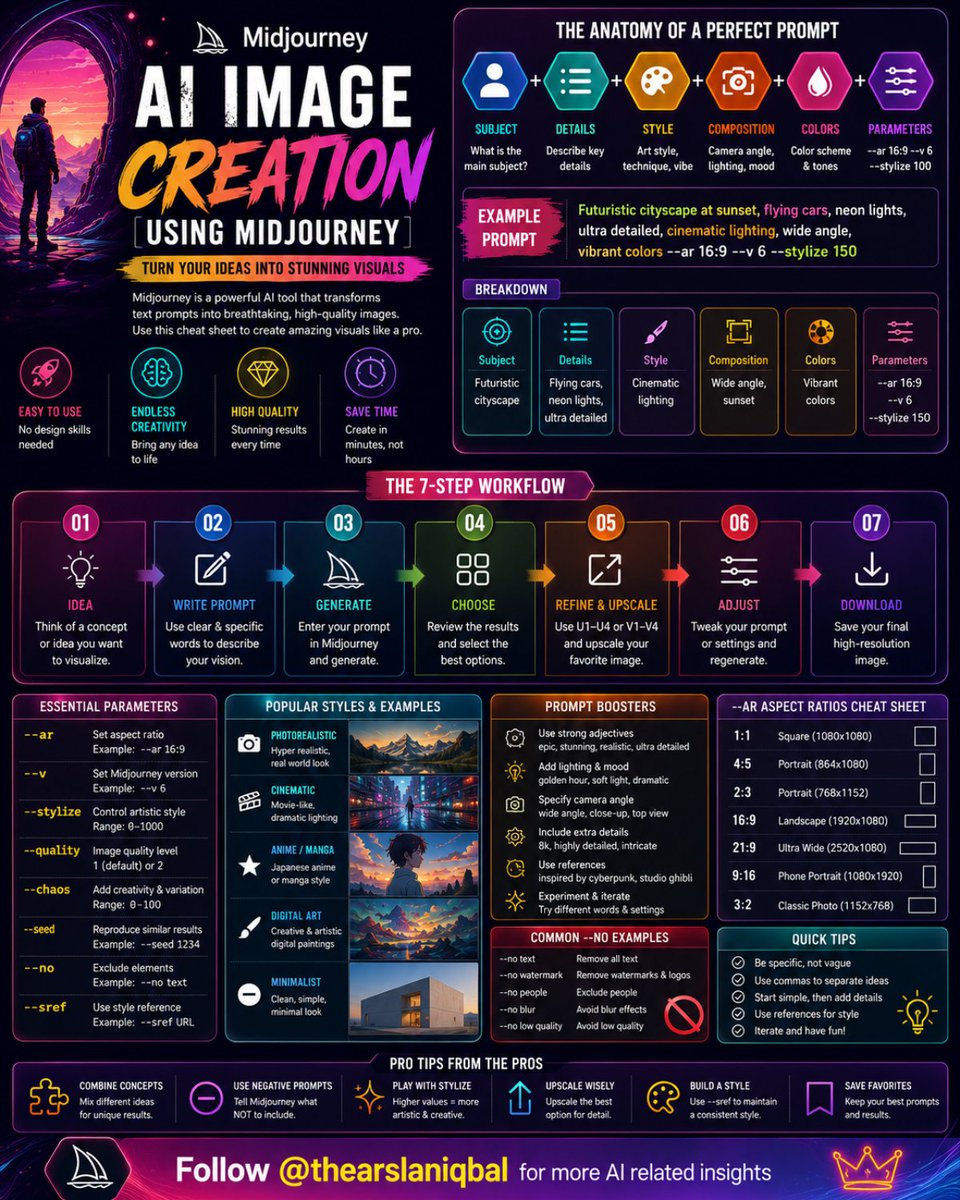
color_palette · dark-moodycolor_palette · neoncomposition · multi-panelmood · futuristicquality_flags · typography-heavysubject_type · diagram-document
提示词(原文,逐字保留)
Most people think Midjourney is an image generator.
It's not.
It's a visual thinking machine.
The difference?
Anyone can type a prompt.
Very few people know how to communicate an idea so clearly that AI turns it into something extraordinary.
That's the real skill.
And once you learn it...
you stop creating images.
You start creating worlds.
With Midjourney, you can:
🎨 Design social media graphics
🚀 Create startup concepts
📦 Visualize product ideas
🏙️ Build cinematic scenes
👤 Generate brand characters
📚 Create book covers
✨ Produce viral visuals
A simple image creation workflow:
1️⃣ Start with the core idea
2️⃣ Define the subject clearly
3️⃣ Add visual details
4️⃣ Choose an art style
5️⃣ Specify lighting and mood
6️⃣ Control composition
7️⃣ Refine and upscale
The biggest mistake beginners make?
Writing short prompts.
The best creators treat prompts like creative briefs.
Instead of:
"Create a futuristic city"
Try:
"Futuristic cyberpunk city at sunset, flying vehicles, neon reflections, cinematic lighting, ultra detailed, wide-angle photography, vibrant colours, award-winning digital art."
The output changes completely.
Think of Midjourney as a creative partner.
The more context you provide...
the better it performs.
The creators winning today are not necessarily the best designers.
They're the best prompt engineers.
Because in the AI era:
Ideas are valuable.
But clearly communicating those ideas is priceless.
This cheat sheet breaks down the exact framework for creating stunning, scroll-stopping visuals with Midjourney.
Follow @thearslaniqbal for more AI related insights.
中文译文
大多数人认为 Midjourney 是一个图像生成器。
其实不是。
它是一台视觉思维机器。
区别在哪?
任何人都可以输入提示词。
但很少有人知道如何清晰地传达一个想法,让 AI 把它变成非凡的作品。
这才是真正的技能。
一旦你掌握了它……
你就不再只是创建图像。
你开始创造世界。
使用 Midjourney,你可以:
🎨 设计社交媒体图形
🚀 创建创业公司概念
📦 可视化产品创意
🏙️ 构建电影级场景
👤 生成品牌角色
📚 创建书籍封面
✨ 制作病毒式传播的视觉作品
一个简单的图像创建工作流程:
1️⃣ 从核心创意开始
2️⃣ 清晰地定义主体
3️⃣ 添加视觉细节
4️⃣ 选择艺术风格
5️⃣ 指定光照和氛围
6️⃣ 控制构图
7️⃣ 优化并放大
初学者犯的最大错误是什么?
写简短的提示词。
最优秀的创作者把提示词当作创意简报来对待。
与其写:
"Create a futuristic city"
不如试试:
"Futuristic cyberpunk city at sunset, flying vehicles, neon reflections, cinematic lighting, ultra detailed, wide-angle photography, vibrant colours, award-winning digital art."
输出结果完全不同。
把 Midjourney 视为你的创意伙伴。
你提供的背景信息越多……
它的表现就越好。
如今脱颖而出的创作者未必是最优秀的设计师。
他们是最优秀的提示词工程师。
因为在 AI 时代:
想法很有价值。
但清晰地传达这些想法则价值连城。
这份速查表详细分解了使用 Midjourney 创建令人惊叹、让人停不下滑动的视觉作品的完整框架。
关注 @thearslaniqbal 获取更多 AI 相关洞察。
来源与署名
原文由 @thearslaniqbal 发布在 X:查看原推文。 本页逐字保留原文并提供机器翻译的中文解读;版权归原作者所有。
同工具的更多提示词
- 优雅的编辑风格人像照:一位美丽的成年女性站在简约的卧室镜子旁,刚醒来,身穿超大号针织毛衣,手捧咖啡杯,肌肤呈现柔和自然的质感,沐浴在温暖的晨光中,氛围安静而真…@tisch_eins
- 我想开始用不同的方式记录人像提示词。 不仅仅是:图像看起来好看吗? 还要记录: 提示词是否干净? 是否需要使用擦边措辞? 是否触发了警告? 生成结果是否仍然像…@tisch_eins
- 这个 SREF 让所有画面都像一段你几乎快要遗忘的记忆。 --sref 3739217155 --v 7 --sv6 温暖的金色光线、柔和的电影感模糊,以及那…@promptsref
- 绘制日本女性角色 然后发送到 ChatGPT 制作角色身份板 提示词 GPT 2.0 : 使用 @image1 作为精确参考,并结合 motorsports…@Cia0_exe
- 如果我必须与审核系统对抗,那么这个提示词很可能就是错的。 这是我目前用于成年肖像创作的原则。 我不想为了站在边界上而去找那条边界。 我想知道美丽的、成熟的、人…@tisch_eins
- 这个 SREF 让所有东西都看起来很昂贵。 --sref 291548067 给人一种奢侈产品广告与科幻电影画面相撞的感觉。 你能获得超写实的纹理、锐利的电影…@promptsref