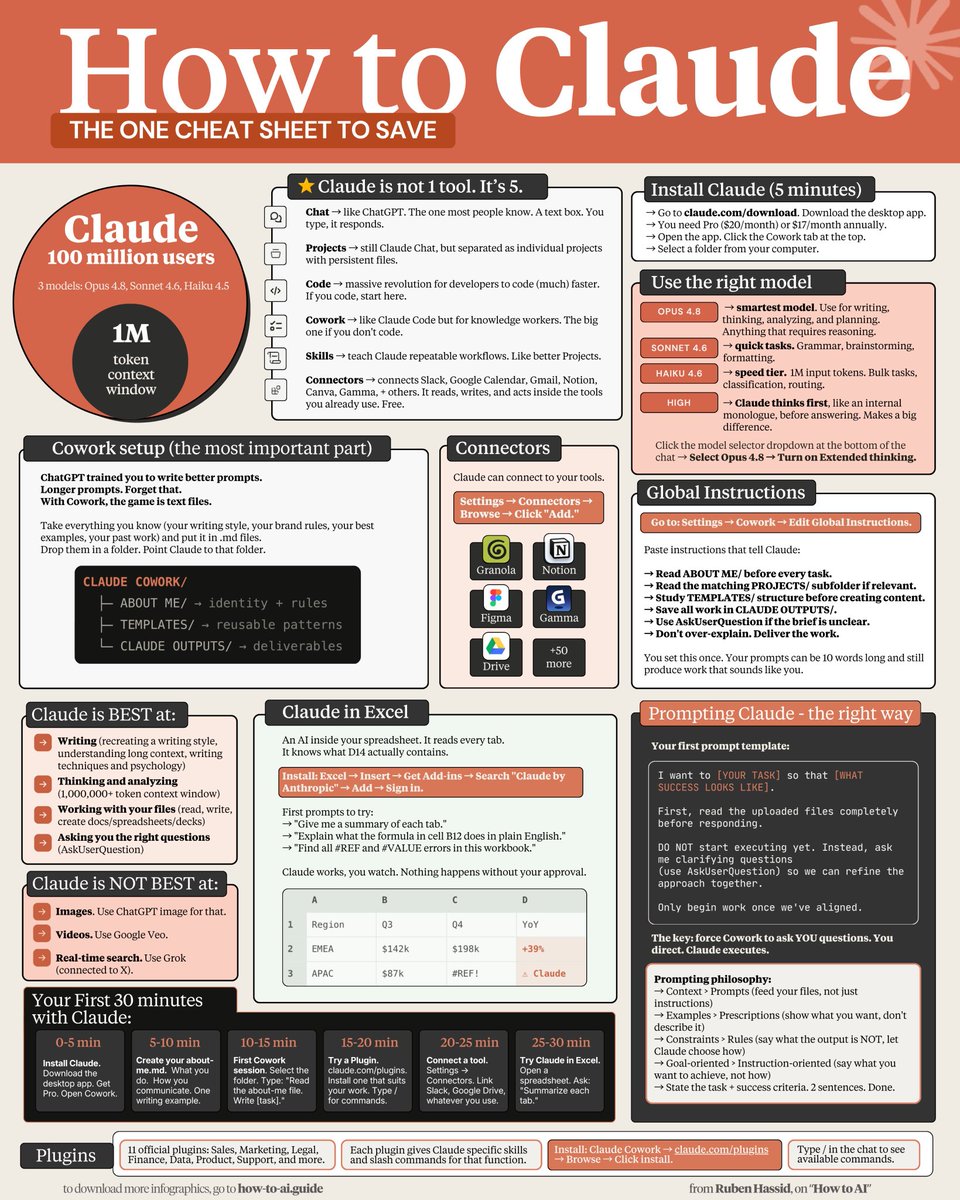
"先阅读 ABOUT ME,保存到 CLAUDE OUTPUTS,不清楚时使用 AskUserQuestion,不要过度解释。
分享链接 · https://openimages.ajiang.me/p/2064550266519851064/
color_palette · high-contrastcolor_palette · warm-tonescomposition · multi-panellighting · studio-lightmood · playfulquality_flags · multi-panel-layout
提示词(原文,逐字保留)
"read ABOUT ME first, save in CLAUDE OUTPUTS, use AskUserQuestion when unclear, don't over-explain."
8: Connectors are free. Turn them on.
Slack, Gmail, Drive, Notion, Figma, Granola + 50 others. Claude reads your emails and messages mid-conversation. Zero copy-paste.
9: Force AskUserQuestion in every prompt.
Claude stops guessing. It generates a form with clarifying questions. You click. Claude executes. Prompting ends.
10: Install Claude in Excel (3 minutes).
Excel → Insert → Get Add-ins → Search "Claude by Anthropic" → Add → Sign in. Ctrl+Option+C to open. It now knows what cell D14 actually contains.
11: Install Plugins from claude .com/plugins.
Sales, Marketing, Legal, Finance, Data, Product, Support + more. Each adds skills and slash commands. Type / in the chat to see them.
12: Skills replace your prompt library.
Turn repeat workflows into slash commands. Type /negotiation-prep + one line. Claude pulls from Gmail, Slack, Granola. Drafts the email. Done.
13: Context > Prompts.
Feed your files, not just prompts. That's the game.
Download my own files at https://t.co/70wspEnO48.
Don't pay anything. Reply to the email to get the link
14: Examples > Prescriptions.
Paste 3 posts you wrote. "Write like this." Claude copies voice faster from examples than from 500 words of description.
15: Images = Use ChatGPT Image (with Thinking).
Claude doesn't generate realistic images (yet).
16: Real-time search = Use Grok.
Connected to X. Covers 99% of what you need.
17: Videos = Use Google Veo-4
Right tool, right job. Stop wasting tokens.
To download all of my Claude infographics:
Step 1. Go to https://t.co/70wspEnO48.
Step 2. Subscribe for free. Don't pay anything.
Step 3. Open my welcome email (most skip this).
Step 4. Hit the automatic reply button inside.
Step 5. Download my infographics from my Notion.
Bonus. Enjoy my best copy-paste prompts, too.
中文译文
"先阅读 ABOUT ME,保存到 CLAUDE OUTPUTS,不清楚时使用 AskUserQuestion,不要过度解释。
8:连接器是免费的。打开它们。
Slack、Gmail、Drive、Notion、Figma、Granola 等 50 多个。Claude 会在对话中途读取你的电子邮件和消息。零复制粘贴。
9:在每个提示中强制使用 AskUserQuestion。
Claude 停止猜测。它会生成一个带有澄清问题的表单。你点击。Claude 执行。提示结束。
10:在 Excel 中安装 Claude(3 分钟)。
Excel → 插入 → 获取加载项 → 搜索 "Claude by Anthropic" → 添加 → 登录。按 Ctrl+Option+C 打开。它现在知道 D14 单元格实际包含什么。
11:从 claude .com/plugins 安装插件。
销售、营销、法律、财务、数据、产品、支持 等更多。每个都添加技能和斜杠命令。在聊天中输入 / 以查看它们。
12:技能取代你的提示库。
将重复的工作流程变成斜杠命令。输入 /negotiation-prep + 一行。Claude 从 Gmail、Slack、Granola 中拉取。起草邮件。完成。
13:上下文 > 提示。
提供你的文件,不仅仅是提示。这就是关键。
从 https://t.co/70wspEnO48 下载我自己的文件。
不要支付任何费用。回复邮件即可获取链接
14:示例 > 处方。
粘贴你写的 3 篇文章。"像这样写。" Claude 从示例中复制语调比从 500 字描述中更快。
15:图片 = 使用 ChatGPT Image(带 Thinking)。
Claude 还不能生成逼真的图片(目前)。
16:实时搜索 = 使用 Grok。
已连接 X。覆盖你需要的 99%。
17:视频 = 使用 Google Veo-4
合适的工具,合适的任务。停止浪费 tokens。
要下载我的所有 Claude 信息图:
步骤 1。前往 https://t.co/70wspEnO48。
步骤 2。免费订阅。无需付费。
步骤 3。打开我的欢迎邮件(大多数人会跳过这一步)。
步骤 4。点击邮件中的自动回复按钮。
步骤 5。从我的 Notion 下载信息图。
奖励。还可以享受我最好的复制粘贴提示。"
来源与署名
原文由 @al_tools43377 发布在 X:查看原推文。 本页逐字保留原文并提供机器翻译的中文解读;版权归原作者所有。
同工具的更多提示词
- 先阅读 ABOUT ME,保存到 CLAUDE OUTPUTS,不清楚时使用 AskUserQuestion,不要过度解释。 8:连接器是免费的。把它们打开…@aisolram
- 一幅在极简白色背景上绘制的素描,采用单色黑色电影美学,捕捉一位身着浴衣的日本佳人凝视夜晚明月的优雅身姿,以黑墨与浅灰色描绘的画作,柔和的炭笔轮廓线,细腻的黑色…@miyajin333
- 一张年轻女性的高质量特写照片:她有着波浪状金发和蓝色眼睛,夜晚坐在座无虚席的棒球场看台上。她带着柔和自信的表情直视镜头。她穿着一件舒适的亮黄色人造毛牛角扣大衣…@Minahil42298354
- 似乎很难摆脱那种 GPT Image 的"风格感"。这是我用这个模板来生成动漫"生き甲斐"(ikigai)艺术风格图像时,所能达到的最接近的效果。 你能看出来…@GlitterPixely
- "先阅读 ABOUT ME,保存到 CLAUDE OUTPUTS 中,不清楚时使用 AskUserQuestion,不要过度解释。" 8:连接器免费。打开它们…@rubenhassid
- 一幅精致的黑白炭笔风格画作,描绘了公园中一派宁静祥和的景象:一位年轻女子舒适地坐在一张木质长椅上,温柔地将她的猫咪抱在膝上。她低头望向怀中的猫,神情平静而充满…@Minahil42298354