把任何穿搭参考变成可重复使用的时尚海报提示 ✨
分享链接 · https://openimages.ajiang.me/p/2061808550964564428/
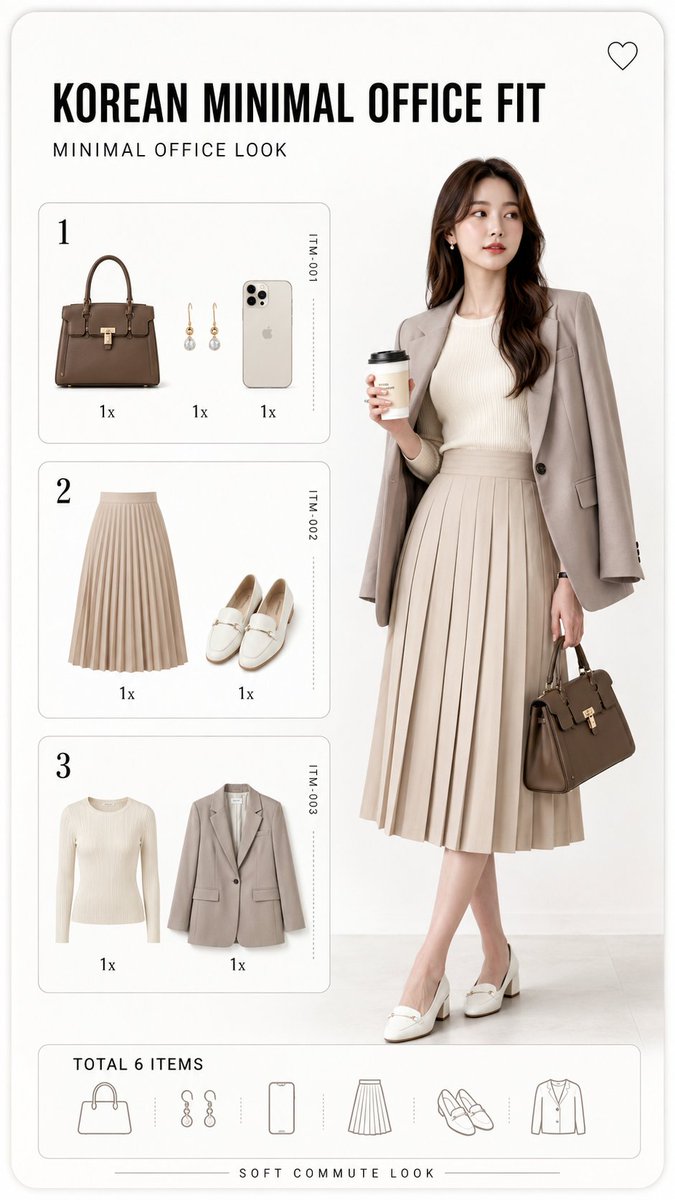
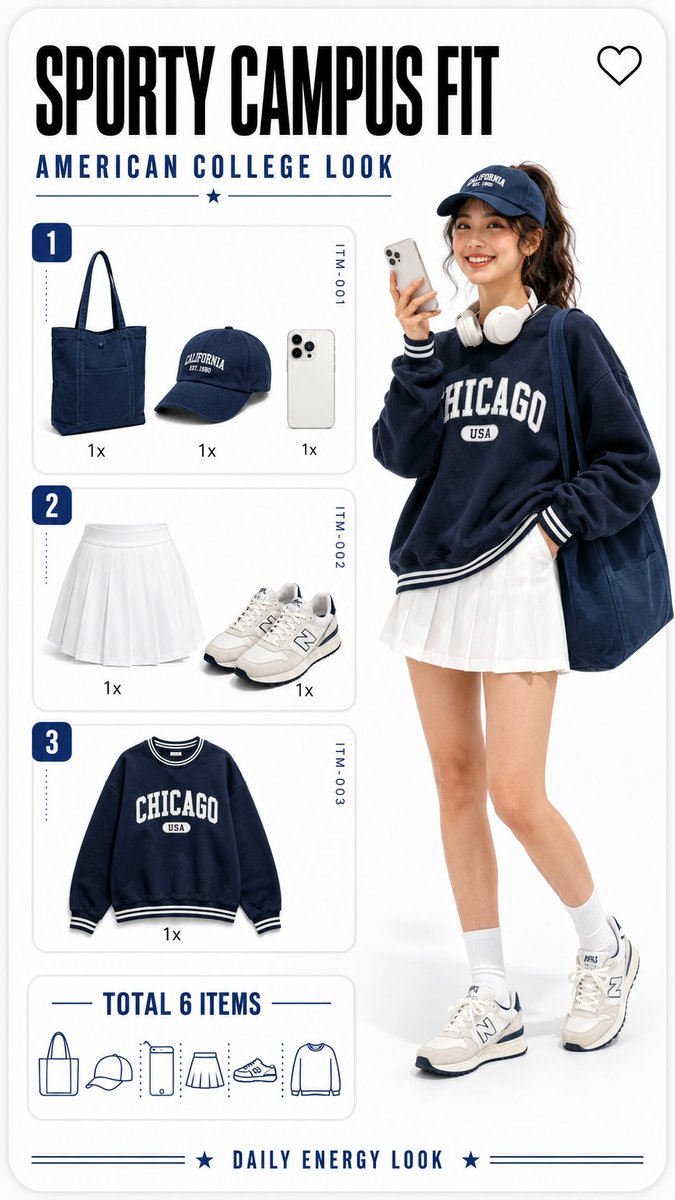
composition · full-bodycomposition · multi-panellighting · studio-lightquality_flags · embedded-textquality_flags · typography-heavyscene · studio
提示词(原文,逐字保留)
Turn any outfit reference into a reusable fashion poster prompt ✨
I broke down this Korean-style lookbook layout into a GPT Image 2 prompt template — with variables for text language, title, outfit items, model styling, checklist panels, and captions.
Copy the structure, swap the variables, and build your own fashion prompt series 👇
```
Create a vertical 9:16 fashion outfit breakdown poster in a clean Korean Y2K lookbook style.
Design the image as a rounded-corner mobile fashion card on a bright white studio background. Use a minimal editorial layout with lots of negative space, soft gray panel borders, subtle shadows, crisp typography, pastel colors, and a polished fashion app UI feeling.
Important text rule:
All visible text in the image must be rendered in [TEXT_LANGUAGE], including the main title, subtitle, panel labels, quantity labels, total item label, and bottom caption.
Use the exact following text:
- Main title: "[MAIN_TITLE]"
- Subtitle: "[SUB_TITLE]"
- Bottom caption: "[BOTTOM_CAPTION]"
- Total label: "[TOTAL_LABEL]"
Top area:
Add a bold main title in large typography, with the subtitle underneath in smaller clean uppercase or matching style depending on the language. Add a small outline heart icon in the top-right corner.
Right side:
Show a full-body adult female fashion model, early 20s, non-sexualized, cute confident pose, standing in soft studio lighting. She is holding a smartphone as if taking a selfie.
Outfit: [OUTFIT_DESCRIPTION].
Keep the model realistic but slightly glossy and doll-like, like a premium digital fashion catalog.
Left side:
Create three stacked outfit checklist panels labeled “1”, “2”, and “3”.
Panel 1 shows: [PANEL_1_ITEMS].
Panel 2 shows: [PANEL_2_ITEMS].
Panel 3 shows: [PANEL_3_ITEMS].
Each item should appear as an isolated product icon with a quantity label such as “1x”.
Add tiny vertical item codes on the right side of each panel, like a fashion inventory card.
Bottom-left area:
Add the total item summary using “[TOTAL_LABEL]”, with small minimalist line icons representing all outfit items.
Overall visual direction:
playful fashion infographic, product flat-lay icons plus full-body model, white background, clean commercial poster composition, high-resolution, sharp details, legible text, no real brand logos, no watermark, no extra characters, no messy background.
```
中文译文
把任何穿搭参考变成可重复使用的时尚海报提示 ✨
我把这个韩系穿搭画册版式拆解成了一个 GPT Image 2 提示词模板 —— 带有文字语言、标题、穿搭单品、模特造型、清单面板和说明文字的变量。
复制结构,替换变量,就能打造你自己的时尚提示词系列 👇
```
创建一个竖版 9:16 的时尚穿搭拆解海报,采用干净的韩系 Y2K 画册风格。
把图像设计成亮白摄影棚背景上的一个圆角移动端时尚卡片。使用极简的编辑式版式,留有大量负空间,搭配柔和的灰色面板边框、细腻的阴影、清晰的字体、粉彩色调,以及精致的时尚 App UI 质感。
文字重要规则:
图像中所有可见文字都必须以 [TEXT_LANGUAGE] 呈现,包括主标题、副标题、面板标签、数量标签、总件数标签和底部说明文字。
请使用以下确切文字:
- 主标题:"[MAIN_TITLE]"
- 副标题:"[SUB_TITLE]"
- 底部说明文字:"[BOTTOM_CAPTION]"
- 总件数标签:"[TOTAL_LABEL]"
顶部区域:
添加一个粗体的大字号主标题,副标题置于其下方,字号较小、风格干净(全大写或根据语言匹配风格)。在右上角添加一个小号描边爱心图标。
右侧:
展示一位全身成年女性时尚模特,20 岁出头,非性感化、可爱自信的站姿,在柔和的摄影棚灯光下。她手握一部智能手机,像是在自拍。
穿搭:[OUTFIT_DESCRIPTION]。
模特保持写实但略带光泽和娃娃感,像高端的数字时尚目录。
左侧:
创建三个上下堆叠的穿搭清单面板,分别标注 “1”、“2”和 “3”。
面板 1 显示:[PANEL_1_ITEMS]。
面板 2 显示:[PANEL_2_ITEMS]。
面板 3 显示:[PANEL_3_ITEMS]。
每个单品应以独立的产品图标呈现,并搭配诸如 “1x” 之类的数量标签。
在每个面板的右侧添加细小的竖向单品编号,像一张时尚库存卡。
左下区域:
使用 “[TOTAL_LABEL]” 添加总件数概览,搭配小巧极简的线条图标,代表所有穿搭单品。
整体视觉方向:
俏皮的时尚信息图风格,产品平铺图标搭配全身模特,白色背景,干净的商用海报构图,高分辨率,细节锐利,文字清晰可辨,无真实品牌 Logo,无水印,无多余人物,背景干净不杂乱。
```
来源与署名
原文由 @gpt_image_2 发布在 X:查看原推文。 本页逐字保留原文并提供机器翻译的中文解读;版权归原作者所有。
同工具的更多提示词
- 在每一口中开启夏天。🍋⚡ Claude x GPT Image 2 🔥 PROMPT ⬇ 一位年轻女性,扎着高马尾,自信地微笑,穿着白色短款上衣、带有白色镶边…@ZephyraLeigh
- 创作一幅手绘涂鸦风格的卡通肖像画,使用粗黑色轮廓线,呈现出故意不完美的速写美学。 风格要求: 粗黑色手绘轮廓线,边缘不规则、不平整 线条略带抖动,营造真实的涂…@Kashberg_0
- 超写实黑白电影感体育海报,主角为[PLAYER NAME],特写肖像,表情坚定而充满戏剧张力,高对比度灯光,深邃阴影,细腻的皮肤纹理,锐利的眼神,高级编辑级摄…@rovvmut_
- 一个超可爱的风格化3D肖像,微笑的小女孩有着闪闪发光的大眼睛和迷人的小酒窝,盘腿坐在温馨的工作室地板上。她有着一头长长的黑发,扎成高马尾并留有柔软的刘海,戴着…@sakshi___007
- 一位时髦的时尚达人和她那只时尚的橙色虎斑猫并肩坐在一家迷人的法国里维埃拉咖啡馆里,两人都戴着优雅的红色猫眼太阳镜。女子有着修长优雅的脖颈、金色波波头发型、夸张…@Sairah_0
- 创建一个超精细的3D毛绒玩具卡通场景,采用经典动画电视风格。画面中心展示一具全身柔软的毛绒角色构图,拥有逼真的蓬松毛发、圆润的玩具般造型、鲜艳饱和的色彩、富有…@iamaiistudio