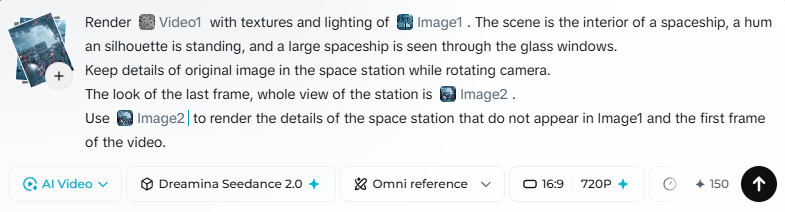
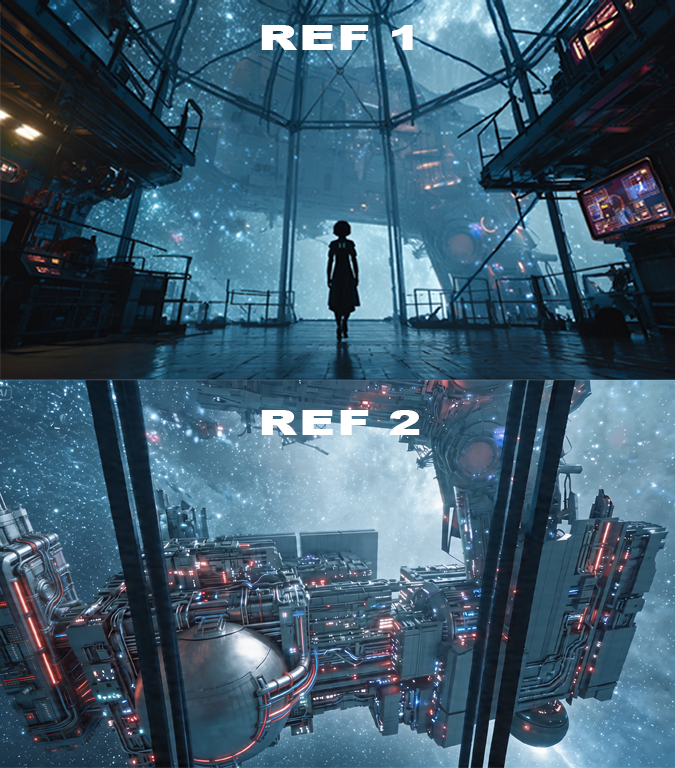
使用“Image1”的纹理和光照来渲染“Video1”。
分享链接 · https://openimages.ajiang.me/p/2045907905384243435/
color_palette · cool-tonescomposition · centeredlighting · low-keyquality_flags · embedded-textquality_flags · multi-panel-layoutscene · outer-space
提示词(原文,逐字保留)
Render "Video1" with textures and lighting of "Image1".
Advanced Prompt: Render "Video1" with textures and lighting of "Image1". The scene is the interior of a spaceship, a human silhouette is standing, and a large spaceship is seen through the glass windows. Keep details of original image in the space station while rotating camera. The look of the last frame, whole view of the station is "Image2". Use "Image2" to render the details of the space station that do not appear in Image1 and the first frame of the video.
中文译文
使用“Image1”的纹理和光照来渲染“Video1”。
高级提示:使用“Image1”的纹理和光照来渲染“Video1”。场景是宇宙飞船的内部,有一个人形剪影站立,透过玻璃窗可以看到一艘大型宇宙飞船。在旋转相机的过程中,保持太空站原图的细节。最后一帧的外观,太空站的整体视图为“Image2”。使用“Image2”来渲染“Image1”和视频第一帧中未出现的太空站细节。
来源与署名
原文由 @voxelplot 发布在 X:查看原推文。 本页逐字保留原文并提供机器翻译的中文解读;版权归原作者所有。
同工具的更多提示词
- 生成一张图片:一位搞笑男主播正在 Tik/Tok 上进行直播,周围环绕着 3D 卡通人物——设计一些有趣的内容。9:16 比例。https://t.co/kY…@pfanis
- 永远是我的猫 😆 提示词 👇 SEEDANCE 15s Omni Reference, 堕落天使 燕尾服猫 / 雅加达末日 (双人与束缚骑手) 风格:超写实…@NyaiiBubu
- 超级简单、直奔主题,为 Seedance 优化的角色设定图提示词。有时越简单越好。这是我在不削弱参考一致性方面的尝试 (˶ᵔ ᵕ ᵔ˶) ‹3 提示词 ⤵️…@GlitterPixely
- 延伸视频。 鸭子对月亮越来越怀疑。 [cut] 全景镜头。鸭子突然停下脚步,凝视着月亮。 鸭子说: "好的。" "我要做个测试。" [cut] 鸭子快速向道路…@jey_jey_Japa
- @ image 对口型同步音频轨道 @ audio 中的歌词。不要修改参考音乐。 音频实际限制为 13 秒。如果添加 15 秒,会出现问题。 最稳定的平台是…@hedo_ist
- 这两个作品都是第一代的尝试。我觉得作为初次制作出来的效果相当不错。 首先,我在 Midjourney 中创建了这个角色:anime wind surfer b…@aimikoda