一个美国胖乎乎的小男孩,穿着休闲的居家T恤,坐在卧室的书桌前,卧室环境是普通日常的,有真实的生活感。镜头像前置手机自拍,竖屏9:16…
分享链接 · https://openimages.ajiang.me/p/2044070258437435422/
composition · centeredcomposition · close-upcomposition · eye-levelhuman_attributes · short-hairscene · indoor-homesubject_type · character
提示词(原文,逐字保留)
An American chubby little boy wearing a casual home T-shirt, sitting at a desk in his bedroom, with an ordinary everyday bedroom setting and a realistic lived-in feel. Shot like a front-facing phone selfie, vertical 9:16, close-up, head-and-shoulders framing, with slight handheld movement, like a casual self-recorded clip. From 0–1.5s he naturally looks at the camera, from 1.5–2.3s he raises one hand and snaps once naturally beside his face, from 2.3–3s he lowers his hand, and from 3–6s he slowly leans his face closer to the camera while slightly turning his head left and right. His expression stays relaxed and natural, with realistic continuous movement, no exaggerated acting, no talking, no extra gestures, no camera cuts, and no scene changes.
Tool: https://t.co/LQ1R3ruV01
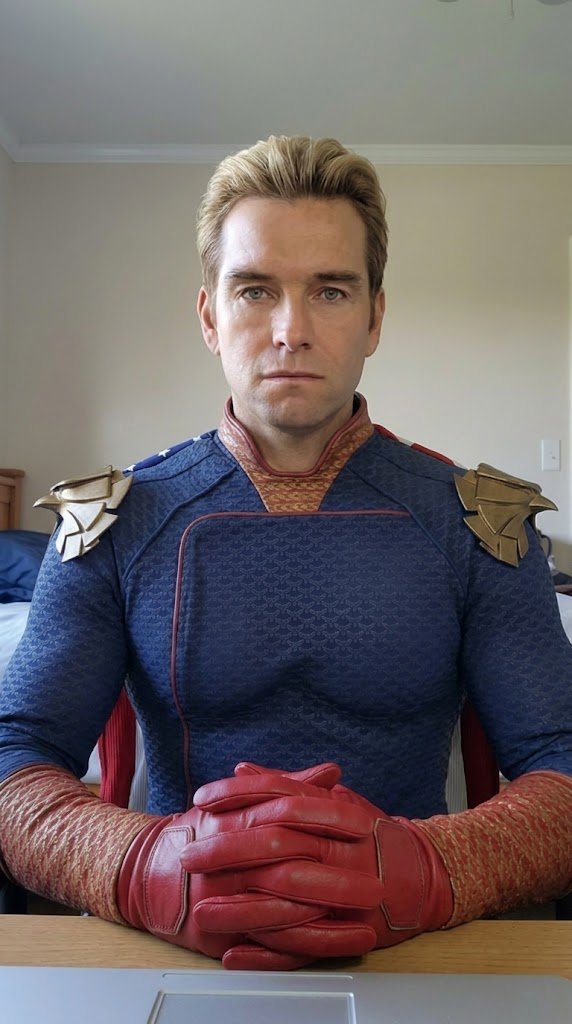
2. I used nano banana pro to generate the Homelander image
I used the first frame from the video above as a reference image, added a reference image of Homelander, and used nano banana pro to do the face replacement.
Prompt:
An image shot with an iPhone front camera. Replace the child in image one with Homelander (reference image two), sitting at a desk in a normal bedroom, with an ordinary everyday bedroom environment and a realistic lived-in feel. Keep the background and pose unchanged. The body proportions should match an adult. Keep the gloves.
Tool: https://t.co/rxvn4Uzl4w
3. I used Kling Motion Control to generate a video with the same movement
This lets Homelander replicate the exact same movement as the original little boy.
Tool: https://t.co/xChgoZI6Tl
Edit everything together in CapCut
4. I combined the two clips in CapCut, and the final result came together.
The whole workflow is actually very simple:
First generate a real motion reference video → then create the target character’s first frame → finally use motion control to recreate the movement.
If you want to make this kind of trending face-swap video too, you can follow this exact workflow and try it yourself. All necessary materials and prompts have been uploaded to our website.
中文译文
一个美国胖乎乎的小男孩,穿着休闲的居家T恤,坐在卧室的书桌前,卧室环境是普通日常的,有真实的生活感。镜头像前置手机自拍,竖屏9:16,近景,头肩构图,带有轻微的手持运动感,像随意自录的小视频。0–1.5秒他自然地看着镜头,1.5–2.3秒他自然地在脸旁抬起一只手弹一次响指,2.3–3秒他放下手,3–6秒他慢慢将脸靠近镜头,同时头部微微左右转动。他的表情保持放松自然,动作真实连贯,没有夸张的表演,没有说话,没有多余的手势,没有镜头切换,也没有场景变化。
工具:https://t.co/LQ1R3ruV01
2. 我使用 nano banana pro 生成了 Homelander 的图片
我将上面视频的第一帧作为参考图,加入 Homelander 的参考图,使用 nano banana pro 进行换脸。
提示词:
一张用 iPhone 前置摄像头拍摄的照片。将图一中的小孩替换为 Homelander(参考图二),坐在正常卧室的书桌前,卧室环境是普通日常的,有真实的生活感。保持背景和姿势不变。身体比例应符合成年人。保留手套。
工具:https://t.co/rxvn4Uzl4w
3. 我使用 Kling Motion Control 生成了带有相同动作的视频
这样可以让 Homelander 完美复刻原来小男孩的动作。
工具:https://t.co/xChgoZI6Tl
在 CapCut 中将所有素材剪辑到一起
4. 我在 CapCut 中将两段视频合成在一起,最终效果就出来了。
整个工作流程其实非常简单:
先生成一个真实动作的参考视频 → 再制作目标角色的首帧图 → 最后用动作控制复刻动作。
如果你也想制作这种热门的换脸视频,可以完全按照这个工作流程自己尝试。所有必要的素材和提示词都已经上传到我们的网站。
来源与署名
原文由 @underwoodxie96 发布在 X:查看原推文。 本页逐字保留原文并提供机器翻译的中文解读;版权归原作者所有。
同工具的更多提示词
- { "generation_request": { "meta_data": { "task_type": "fashion_editorial_2x2_gr…@astronomerozge1
- { "generation_request": { "meta_data": { "task_type": "black_gold_ultra_luxury_…@astronomerozge1
- 写实风格,超高分辨率8K图像,位于极简纯白工作室中,地板和墙壁无缝衔接。使用参考图像的所有面部和身份特征,不做任何改动。 一位身材健美、高挑的女性,拥有运动型…@XSydneyFan
- { "generation_request": { "meta_data": { "task_type": "ronda_cliff_editorial" }…@astronomerozge1
- 一个[Name]黑鸦片香水瓶悬浮在空中,周围环绕着闪闪发光的玫瑰金水晶碎片,在柔和的腮红粉背景上形成戏剧性的光影对比,氛围感辉光,闪烁的质感,电影级美妆商业美…@Strength04_X
- { "generation_request": { "meta_data": { "task_type": "valencia_future_editoria…@astronomerozge1